Optional module · pdftoolkit/html-to-pdf 0.4.0
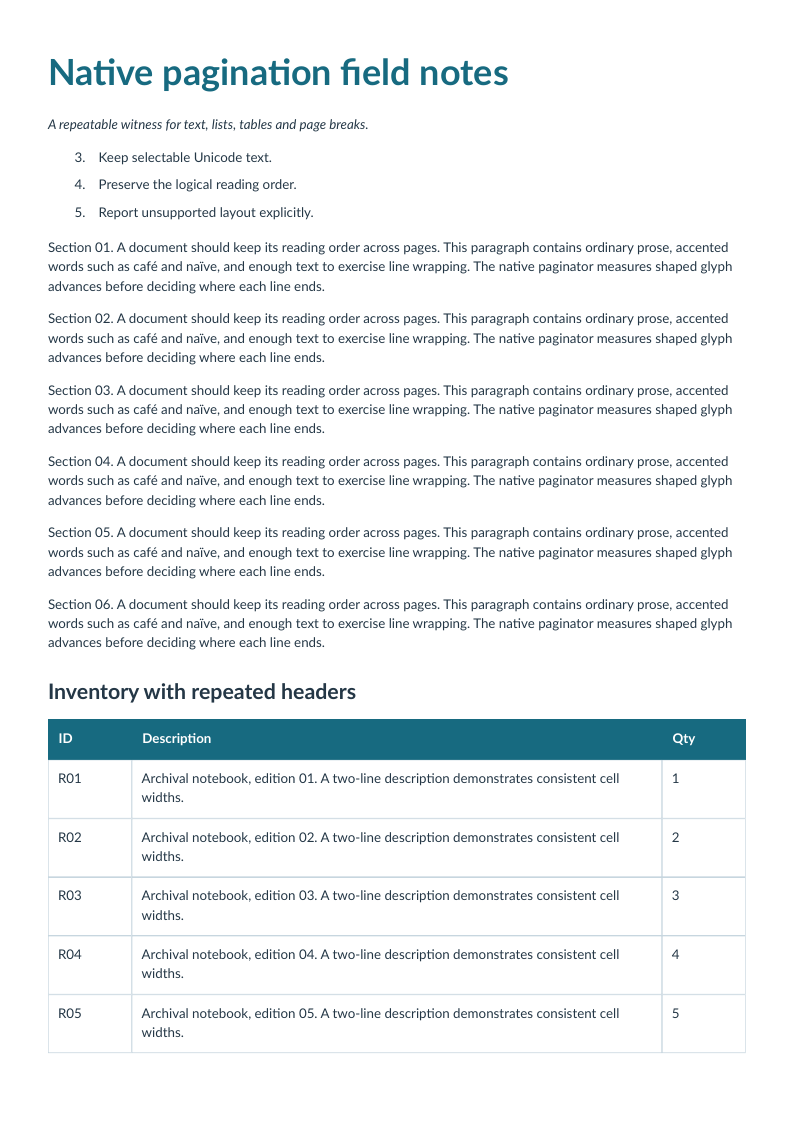
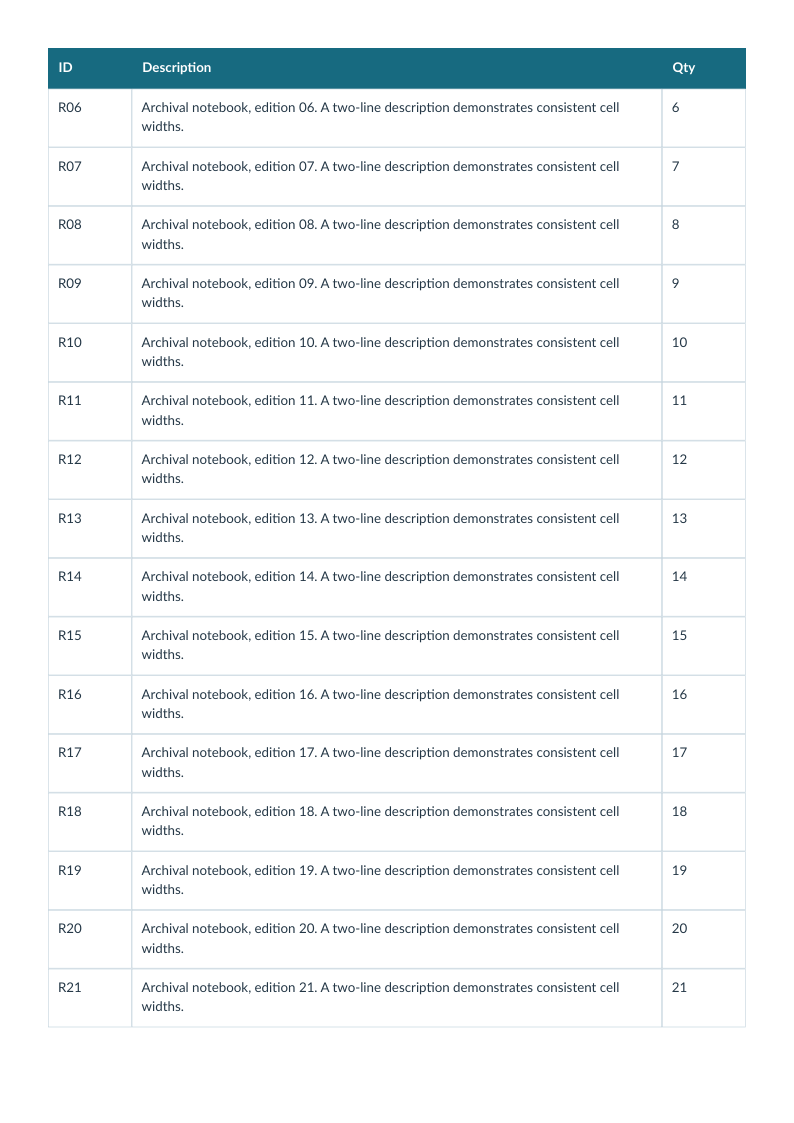
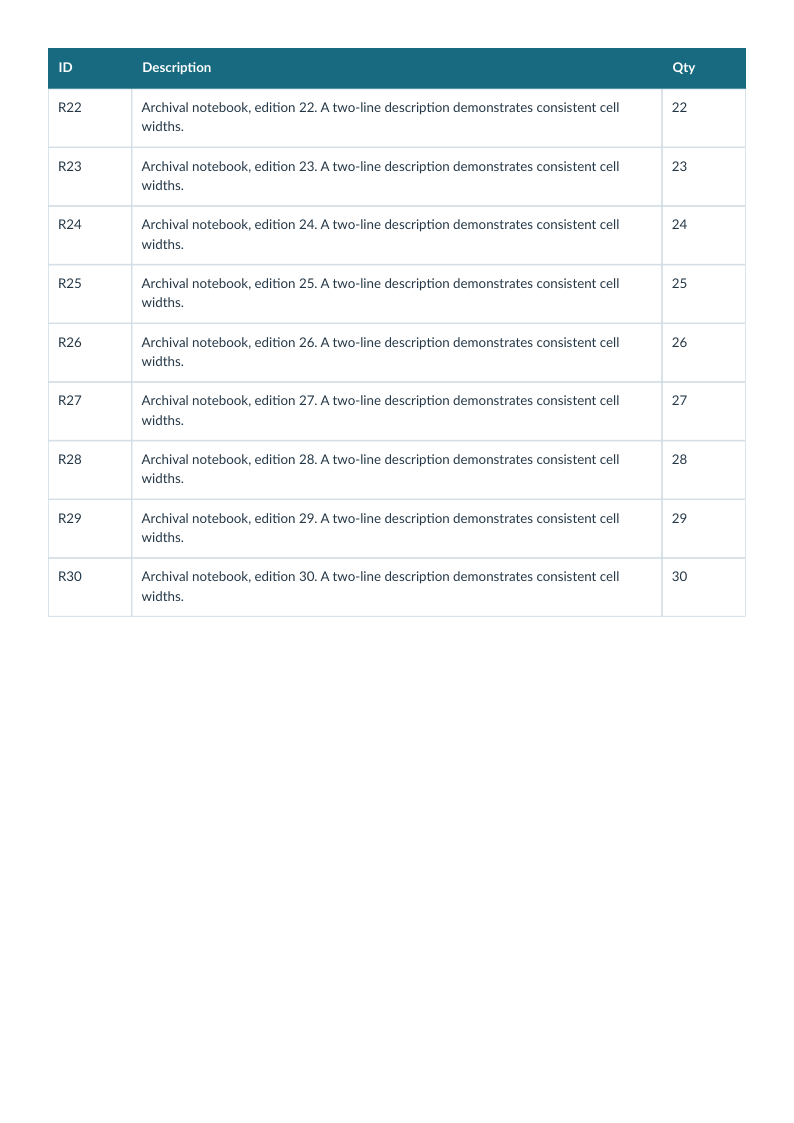
A four-page document combines paragraphs, a numbered list, thirty inventory rows and an explicit closing-page break. Table rows remain indivisible; repeated headers are artifacts after their first occurrence.
The oracle checks all thirty records, 31 logical TR elements including the header, three logical TH elements and a closing note on the final page. Every page is rasterized and checked for unintended clipping or blank output.
php -d memory_limit=512M examples/generate.php _build/examples
python tools/validate_pdf.py --directory _build/examples
This example illustrates the documented profile, not a complete CSS level or PDF/UA certification.
View the PDF result
This file was generated with the code in this documentation. All pages appear below; open the PDF to use its links and bookmarks.

Use the browser PDF viewer
This viewer depends on your browser. If the document does not appear, use “Open the PDF” or “Download”.
HTML source
Read the HTML source
<!doctype html>
<html lang="en"><head><meta charset="utf-8"><title>Native pagination field notes</title>
<style>
body { font-size: 10pt; line-height: 1.45; color: #243746; }
h1 { font-size: 27pt; color: #176a80; margin: 0 0 12pt; }
h2 { font-size: 16pt; margin: 18pt 0 8pt; }
p { margin: 0 0 10pt; orphans: 2; widows: 2; }
ul, ol { margin: 0 0 12pt; padding-left: 20pt; }
li { margin: 0 0 6pt; }
table { table-layout: fixed; width: 100%; margin: 0; }
th { background-color: #176a80; color: white; padding: 8pt; text-align: left; }
td { padding: 7pt; border: 0.5pt solid #c7d6df; }
.id { width: 12%; } .description { width: 76%; } .quantity { width: 12%; }
.closing { break-before: page; }
.note { background-color: #e7eff4; padding: 12pt; }
</style></head><body>
<h1>Native pagination field notes</h1>
<p><em>A repeatable witness for text, lists, tables and page breaks.</em></p>
<ol start="3"><li>Keep selectable Unicode text.</li><li>Preserve the logical reading order.</li><li>Report unsupported layout explicitly.</li></ol>
<p>Section 01. A document should keep its reading order across pages. This paragraph contains ordinary prose, accented words such as café and naïve, and enough text to exercise line wrapping. The native paginator measures shaped glyph advances before deciding where each line ends.</p>
<p>Section 02. A document should keep its reading order across pages. This paragraph contains ordinary prose, accented words such as café and naïve, and enough text to exercise line wrapping. The native paginator measures shaped glyph advances before deciding where each line ends.</p>
<p>Section 03. A document should keep its reading order across pages. This paragraph contains ordinary prose, accented words such as café and naïve, and enough text to exercise line wrapping. The native paginator measures shaped glyph advances before deciding where each line ends.</p>
<p>Section 04. A document should keep its reading order across pages. This paragraph contains ordinary prose, accented words such as café and naïve, and enough text to exercise line wrapping. The native paginator measures shaped glyph advances before deciding where each line ends.</p>
<p>Section 05. A document should keep its reading order across pages. This paragraph contains ordinary prose, accented words such as café and naïve, and enough text to exercise line wrapping. The native paginator measures shaped glyph advances before deciding where each line ends.</p>
<p>Section 06. A document should keep its reading order across pages. This paragraph contains ordinary prose, accented words such as café and naïve, and enough text to exercise line wrapping. The native paginator measures shaped glyph advances before deciding where each line ends.</p>
<h2>Inventory with repeated headers</h2>
<table><thead><tr><th class="id" scope="col">ID</th><th class="description" scope="col">Description</th><th class="quantity" scope="col">Qty</th></tr></thead><tbody>
<tr><td>R01</td><td>Archival notebook, edition 01. A two-line description demonstrates consistent cell widths.</td><td>1</td></tr>
<tr><td>R02</td><td>Archival notebook, edition 02. A two-line description demonstrates consistent cell widths.</td><td>2</td></tr>
<tr><td>R03</td><td>Archival notebook, edition 03. A two-line description demonstrates consistent cell widths.</td><td>3</td></tr>
<tr><td>R04</td><td>Archival notebook, edition 04. A two-line description demonstrates consistent cell widths.</td><td>4</td></tr>
<tr><td>R05</td><td>Archival notebook, edition 05. A two-line description demonstrates consistent cell widths.</td><td>5</td></tr>
<tr><td>R06</td><td>Archival notebook, edition 06. A two-line description demonstrates consistent cell widths.</td><td>6</td></tr>
<tr><td>R07</td><td>Archival notebook, edition 07. A two-line description demonstrates consistent cell widths.</td><td>7</td></tr>
<tr><td>R08</td><td>Archival notebook, edition 08. A two-line description demonstrates consistent cell widths.</td><td>8</td></tr>
<tr><td>R09</td><td>Archival notebook, edition 09. A two-line description demonstrates consistent cell widths.</td><td>9</td></tr>
<tr><td>R10</td><td>Archival notebook, edition 10. A two-line description demonstrates consistent cell widths.</td><td>10</td></tr>
<tr><td>R11</td><td>Archival notebook, edition 11. A two-line description demonstrates consistent cell widths.</td><td>11</td></tr>
<tr><td>R12</td><td>Archival notebook, edition 12. A two-line description demonstrates consistent cell widths.</td><td>12</td></tr>
<tr><td>R13</td><td>Archival notebook, edition 13. A two-line description demonstrates consistent cell widths.</td><td>13</td></tr>
<tr><td>R14</td><td>Archival notebook, edition 14. A two-line description demonstrates consistent cell widths.</td><td>14</td></tr>
<tr><td>R15</td><td>Archival notebook, edition 15. A two-line description demonstrates consistent cell widths.</td><td>15</td></tr>
<tr><td>R16</td><td>Archival notebook, edition 16. A two-line description demonstrates consistent cell widths.</td><td>16</td></tr>
<tr><td>R17</td><td>Archival notebook, edition 17. A two-line description demonstrates consistent cell widths.</td><td>17</td></tr>
<tr><td>R18</td><td>Archival notebook, edition 18. A two-line description demonstrates consistent cell widths.</td><td>18</td></tr>
<tr><td>R19</td><td>Archival notebook, edition 19. A two-line description demonstrates consistent cell widths.</td><td>19</td></tr>
<tr><td>R20</td><td>Archival notebook, edition 20. A two-line description demonstrates consistent cell widths.</td><td>20</td></tr>
<tr><td>R21</td><td>Archival notebook, edition 21. A two-line description demonstrates consistent cell widths.</td><td>21</td></tr>
<tr><td>R22</td><td>Archival notebook, edition 22. A two-line description demonstrates consistent cell widths.</td><td>22</td></tr>
<tr><td>R23</td><td>Archival notebook, edition 23. A two-line description demonstrates consistent cell widths.</td><td>23</td></tr>
<tr><td>R24</td><td>Archival notebook, edition 24. A two-line description demonstrates consistent cell widths.</td><td>24</td></tr>
<tr><td>R25</td><td>Archival notebook, edition 25. A two-line description demonstrates consistent cell widths.</td><td>25</td></tr>
<tr><td>R26</td><td>Archival notebook, edition 26. A two-line description demonstrates consistent cell widths.</td><td>26</td></tr>
<tr><td>R27</td><td>Archival notebook, edition 27. A two-line description demonstrates consistent cell widths.</td><td>27</td></tr>
<tr><td>R28</td><td>Archival notebook, edition 28. A two-line description demonstrates consistent cell widths.</td><td>28</td></tr>
<tr><td>R29</td><td>Archival notebook, edition 29. A two-line description demonstrates consistent cell widths.</td><td>29</td></tr>
<tr><td>R30</td><td>Archival notebook, edition 30. A two-line description demonstrates consistent cell widths.</td><td>30</td></tr>
</tbody></table>
<h2 class="closing">Closing note</h2>
<p class="note">This heading begins on a new page because the source requests a forced page break. The table above contains every row from R01 through R30, once in logical order.</p>
<p>End of document — all thirty inventory records are present.</p>
</body></html>
Complete source code
Code from pdftoolkit/html-to-pdf · View the source at the documented commit ↗ · HTML source at the documented commit ↗
Read the commented script: generate.php
<?php

declare(strict_types=1);

use PDF\HtmlToPdf\ConversionOptions;
use PDF\HtmlToPdf\Converter;
use PDF\HtmlToPdf\Font\FontFace;
use PDF\HtmlToPdf\Font\FontSet;
use PDF\HtmlToPdf\HtmlSource;
use PDF\HtmlToPdf\Resource\ImageAsset;
use PDF\HtmlToPdf\Resource\ResourceCatalog;

require dirname(__DIR__) . '/vendor/autoload.php';

// This CLI explicitly owns file access. The library receives only immutable bytes.
$destination = $argv[1] ?? dirname(__DIR__) . '/_build/examples';
if (!is_dir($destination) && !mkdir($destination, 0777, true) && !is_dir($destination)) {
    throw new RuntimeException('Cannot create the example output directory.');
}
$read = static function (string $path): string {
    $bytes = file_get_contents($path);
    if ($bytes === false) {
        throw new RuntimeException('Cannot read ' . $path);
    }

    return $bytes;
};
$fonts = new FontSet(
    regular: new FontFace($read(__DIR__ . '/assets/fonts/Lato-Regular.ttf')),
    bold: new FontFace($read(__DIR__ . '/assets/fonts/Lato-Bold.ttf')),
    italic: new FontFace($read(__DIR__ . '/assets/fonts/Lato-Italic.ttf')),
);
$images = [];
foreach (['notebook', 'lamp', 'mug'] as $name) {
    $images[$name . '.png'] = new ImageAsset($read(__DIR__ . '/assets/images/' . $name . '.png'));
}
$options = new ConversionOptions(fonts: $fonts, resources: new ResourceCatalog(images: $images));
$converter = new Converter();
$manifest = ['php' => PHP_VERSION, 'engine' => 'native-php', 'documents' => []];
foreach (['invoice', 'catalogue', 'multipage', 'css1'] as $name) {
    $started = hrtime(true);
    $html = $read(__DIR__ . '/sources/' . $name . '.html');
    $result = $converter->convert(new HtmlSource($html), $options);
    file_put_contents($destination . '/' . $name . '.pdf', $result->pdf);
    $manifest['documents'][$name] = [
        'pages' => $result->pageCount,
        'elapsedSeconds' => (hrtime(true) - $started) / 1e9,
        'peakMemoryBytes' => memory_get_peak_usage(true),
        'sourceSha256' => hash('sha256', $html),
        'pdfSha256' => hash('sha256', $result->pdf),
        'bytes' => strlen($result->pdf),
        'diagnostics' => $result->diagnostics,
    ];
    fwrite(STDOUT, $name . ': ' . $result->pageCount . ' page(s), ' . strlen($result->pdf) . " bytes\n");
}
file_put_contents($destination . '/manifest.json', json_encode($manifest, JSON_PRETTY_PRINT | JSON_UNESCAPED_UNICODE | JSON_THROW_ON_ERROR) . "\n");