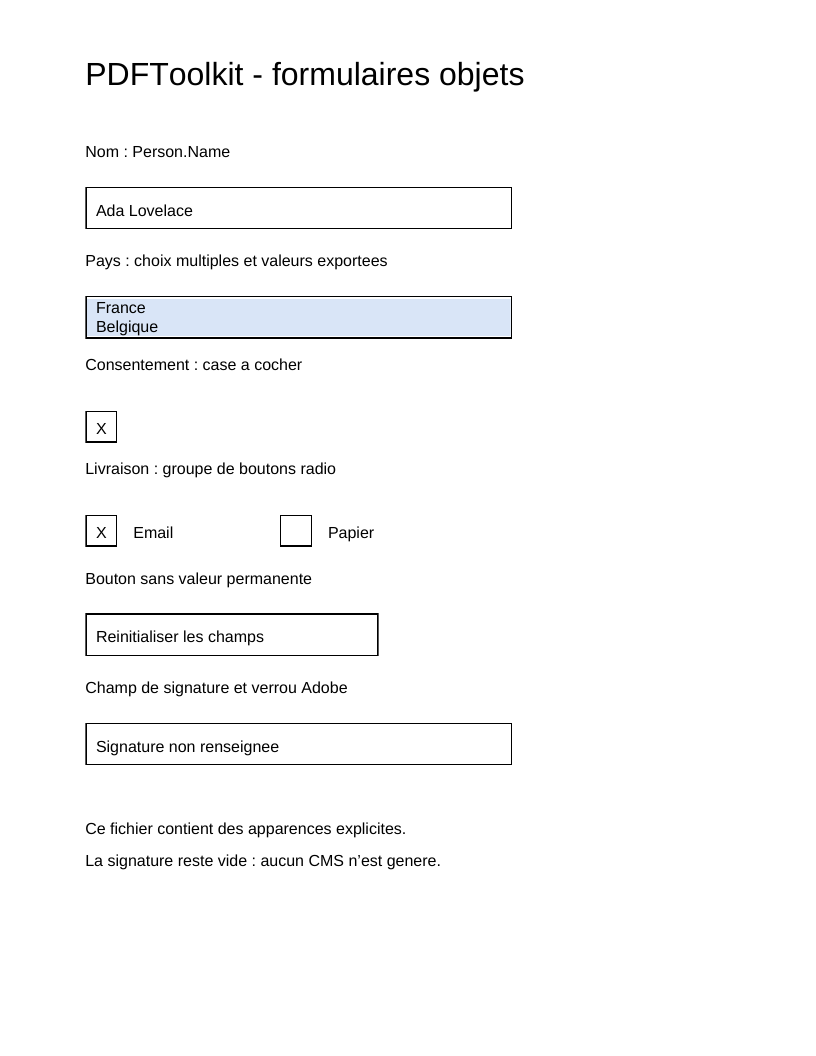
The complete script produces a page with a name, country list, checkbox, radio buttons, reset button and empty signature field.
php examples/acroform-fields.php acroform-fields.pdf
FieldTree carries inherited values: Helvetica resource, default text appearance
and alignment. NonTerminalField creates the Person group; its children have
partial names. The full name Person.Name follows from the tree.
Value /V and appearance /AP have different purposes. The former describes
data; the latter is a Form XObject drawing the widget with its own BBox and
resources. Changing the value does not recalculate the appearance: supply a
new appearance or explicitly choose NeedAppearances.
Editable text in both /Tx and /Ch fields is enclosed in a /Tx BMC ... EMC
sequence. This marker's name remains Tx, even for a Ch list. A reader replaces
only that sequence during editing; the frame stays outside. Without the marker,
the ISO procedure appends new text at the end of the stream and preserves the
old drawing, which can produce overlapping text in Acrobat Reader.
The script composes this sequence with BeginMarkedContent, SaveGraphicsState,
BeginTextObject, EndTextObject, RestoreGraphicsState and EndMarkedContent
objects. Clipping is inside too: Q restores it and it can be replaced with the
text. Button and signature appearances remain separate drawings; they do not
require this variable-text marker.
WidgetAnnotation connects a field to its rectangle on the page. The field lists
its widgets in /Kids, each widget points back through /Parent, and the page
references them in /Annots. The writer checks that they belong to the actual
catalog. A checkbox has /Off and /Yes appearances; /AS selects the state.
The list distinguishes display labels from export values.
ChoiceValueDomain::ExportValues makes the choice explicit where some ISO wording
is ambiguous; /I retains selected indices in /Opt. The initial appearance
draws France and Belgique on two lines, with both selections inside the variable
sequence. It does not draw export codes FR and BE, which belong to field data.
Change values, options, rectangles or states in the script to observe each link. The signature field stays empty here; tutorial 20 creates a signature. Barcode codecs, scripts and XFA execution require their own engines.
Reference: ISO 12.7, physical pages 438–473; variable text and replacement
procedure §12.7.3.3, pages 443–444. Adobe supplement pages 42–48 and page 121,
notes 118–119: without /MK, Acrobat preserves content outside the /Tx sequence.
The presence of /MK requests complete appearance regeneration; it is not
required for this script's custom appearances.
View the PDF result
This file was generated with the code in this documentation. All pages appear below; open the PDF to use its links and bookmarks.
Use the browser PDF viewer
This viewer depends on your browser. If the document does not appear, use “Open the PDF” or “Download”.
Complete source code
Code from roukmoute/pdf · View the source at the documented commit ↗
Read the commented script: acroform-fields.php
<?php

declare(strict_types=1);

use PDF\Document\Extensions\DeveloperExtension;
use PDF\Document\Extensions\DeveloperExtensionEntry;
use PDF\Document\Extensions\DeveloperExtensions;
use PDF\Document\Extensions\DeveloperPrefix;
use PDF\Document\Fonts\StandardFont;
use PDF\Document\Fonts\Type1Font;
use PDF\Document\Forms\AcroForm;
use PDF\Document\Forms\AppearanceState;
use PDF\Document\Forms\AppearanceStates;
use PDF\Document\Forms\ButtonField;
use PDF\Document\Forms\ButtonFieldFlag;
use PDF\Document\Forms\ChoiceField;
use PDF\Document\Forms\ChoiceFieldFlag;
use PDF\Document\Forms\ChoiceOption;
use PDF\Document\Forms\ChoiceOptions;
use PDF\Document\Forms\ChoiceSelection;
use PDF\Document\Forms\ChoiceFieldValue;
use PDF\Document\Forms\ChoiceValueDomain;
use PDF\Document\Forms\DefaultAppearance;
use PDF\Document\Forms\TextFieldFlags;
use PDF\Document\Forms\ChoiceFieldFlags;
use PDF\Document\Forms\ButtonFieldFlags;
use PDF\Document\Forms\FieldTree;
use PDF\Document\Forms\FormAppearanceStream;
use PDF\Document\Forms\NonTerminalField;
use PDF\Document\Forms\PartialFieldName;
use PDF\Document\Forms\SignatureField;
use PDF\Document\Forms\SignatureFieldLock;
use PDF\Document\Forms\SignatureLockAction;
use PDF\Document\Forms\TextField;
use PDF\Document\Forms\WidgetAnnotation;
use PDF\Document\Forms\WidgetAppearance;
use PDF\Document\ResourceDictionary;
use PDF\Document\Resources\Font;
use PDF\FileStructure;
use PDF\Specification\Dictionary\ResetFormActionTable238;
use PDF\Syntax\ContentStreamsResources\ContentStreams;
use PDF\Syntax\ContentStreamsResources\Operators\AppendRectangle;
use PDF\Syntax\ContentStreamsResources\Operators\BeginMarkedContent;
use PDF\Syntax\ContentStreamsResources\Operators\BeginTextObject;
use PDF\Syntax\ContentStreamsResources\Operators\ClipPathNonzero;
use PDF\Syntax\ContentStreamsResources\Operators\EndMarkedContent;
use PDF\Syntax\ContentStreamsResources\Operators\EndPath;
use PDF\Syntax\ContentStreamsResources\Operators\EndTextObject;
use PDF\Syntax\ContentStreamsResources\Operators\FillPathNonzero;
use PDF\Syntax\ContentStreamsResources\Operators\MoveTextPosition;
use PDF\Syntax\ContentStreamsResources\Operators\RestoreGraphicsState;
use PDF\Syntax\ContentStreamsResources\Operators\SaveGraphicsState;
use PDF\Syntax\ContentStreamsResources\Operators\SetLineWidth;
use PDF\Syntax\ContentStreamsResources\Operators\SetNonstrokingGray;
use PDF\Syntax\ContentStreamsResources\Operators\SetNonstrokingRGBColor;
use PDF\Syntax\ContentStreamsResources\Operators\SetTextFontAndSize;
use PDF\Syntax\ContentStreamsResources\Operators\ShowText;
use PDF\Syntax\ContentStreamsResources\Operators\StrokePath;
use PDF\Syntax\DataStructure\Rectangle;
use PDF\Syntax\DataStructure\TextString;
use PDF\Syntax\DocumentStructure\CatalogDictionary\AcroForm as AcroFormEntry;
use PDF\Syntax\DocumentStructure\CatalogDictionary\Extensions;
use PDF\Syntax\DocumentStructure\DocumentCatalog;
use PDF\Syntax\DocumentStructure\PageTree\PageObject;
use PDF\Syntax\DocumentStructure\PageTree\PageTreeNode;
use PDF\Syntax\FileStructure\FileBody;
use PDF\Syntax\FileStructure\FileHeader;
use PDF\Syntax\Object\ArrayType;
use PDF\Syntax\Object\DictionaryObject\Entry;
use PDF\Syntax\Object\DictionaryType;
use PDF\Syntax\Object\IndirectReference;
use PDF\Syntax\Object\IntegerType;
use PDF\Syntax\Object\NameType;
use PDF\Syntax\Object\NumericType;
use PDF\Syntax\Object\StreamObject;
use PDF\Syntax\Object\StringObject\LiteralString;

require dirname(__DIR__) . '/vendor/autoload.php';

// Each text value, font, resource, field and appearance is supplied explicitly.
// The AcroForm performs no automatic layout or font measurement.
$font = new Type1Font(StandardFont::Helvetica);
$resources = new ResourceDictionary(new Font(new DictionaryType(new Entry(new NameType('Helv'), new IndirectReference($font)))));
$default = new DefaultAppearance(new SetTextFontAndSize(new NameType('Helv'), new NumericType(12)), new SetNonstrokingGray(new NumericType(0)));
$tree = new FieldTree($default, $resources);
$person = new NonTerminalField(new PartialFieldName(new TextString('Person')));
$name = new TextField(new PartialFieldName(new TextString('Name')), value: new TextString('Ada Lovelace'), maximumLength: new IntegerType(40));
$countries = new ChoiceField(
    new PartialFieldName(new TextString('Countries')),
    new ChoiceOptions(new ChoiceOption(new TextString('France'), new TextString('FR')), new ChoiceOption(new TextString('Belgique'), new TextString('BE'))),
    new ChoiceFieldFlags(ChoiceFieldFlag::MultiSelect),
    // The /V interpretation is explicit: export values, as used by common
    // readers; the ISO prose on p.454 also mentions display names.
    new ChoiceFieldValue(ChoiceValueDomain::ExportValues, new ArrayType(new TextString('FR'), new TextString('BE'))),
    new ChoiceSelection(new IntegerType(0), new IntegerType(1)),
);
$consent = new ButtonField(new PartialFieldName(new TextString('Consent')), value: new NameType('Yes'));
$delivery = new ButtonField(new PartialFieldName(new TextString('Delivery')), new ButtonFieldFlags(ButtonFieldFlag::Radio), new NameType('Email'));
$reset = new ButtonField(new PartialFieldName(new TextString('Reset')), new ButtonFieldFlags(ButtonFieldFlag::Pushbutton));
$signature = new SignatureField(new PartialFieldName(new TextString('Signature')), lock: new SignatureFieldLock(SignatureLockAction::All, permissions: new IntegerType(2)));
$person->addField($name)->addField($countries)->addField($consent)->addField($delivery)->addField($reset)->addField($signature);
$tree->addRoot($person);

// An appearance is a Form XObject whose BBox is local to the widget. Visible
// bytes are distinct from /V: changing a value requires a new AP,
// or an explicit NeedAppearances request to the reader. AP is supplied here.
// The frame remains static. For /Tx and /Ch, /Tx BMC ... EMC tells
// readers what to REPLACE during editing (ISO 12.7.3.3, p.444).
// Without this section, Acrobat adds text and retains the old drawing.
$drawAppearance = static function (ContentStreams $contents, int $width, int $height) use ($resources): FormAppearanceStream {
    return new FormAppearanceStream(new ContentStreams(
        new SetLineWidth(new NumericType(1)),
        new AppendRectangle(new NumericType(0.5), new NumericType(0.5), new NumericType($width - 1), new NumericType($height - 1)),
        new StrokePath(),
        ...$contents->operators,
    ), new Rectangle(new NumericType(0), new NumericType(0), new NumericType($width), new NumericType($height)), $resources);
};
$label = static fn (string $text, int $height): ContentStreams => new ContentStreams(
    new BeginTextObject(),
    new SetTextFontAndSize(new NameType('Helv'), new NumericType(12)),
    new SetNonstrokingGray(new NumericType(0)),
    new MoveTextPosition(new NumericType(8), new NumericType(($height - 12) / 2)),
    new ShowText(new LiteralString($text)),
    new EndTextObject(),
);
$rectangle = static fn (int $x, int $y, int $width, int $height): Rectangle => new Rectangle(new NumericType($x), new NumericType($y), new NumericType($x + $width), new NumericType($y + $height));
$print = new Entry(new NameType('F'), new IntegerType(4));
$nameAppearance = $drawAppearance(new ContentStreams(...[
    new BeginMarkedContent(new NameType('Tx')),
    new SaveGraphicsState(),
    new AppendRectangle(new NumericType(1), new NumericType(1), new NumericType(318), new NumericType(30)),
    new ClipPathNonzero(),
    new EndPath(),
    ...$label('Ada Lovelace', 32)->operators,
    new RestoreGraphicsState(),
    new EndMarkedContent(),
]), 320, 32);
// A list draws its /Opt labels line by line and both /I selections.
// Export values FR/BE remain exclusively /V data.
// Highlighting and lines are all inside the replaceable variable section.
$countryAppearance = $drawAppearance(new ContentStreams(
    new BeginMarkedContent(new NameType('Tx')),
    new SaveGraphicsState(),
    new AppendRectangle(new NumericType(1), new NumericType(1), new NumericType(318), new NumericType(30)),
    new ClipPathNonzero(),
    new EndPath(),
    new SetNonstrokingRGBColor(new NumericType(0.85), new NumericType(0.9), new NumericType(0.97)),
    new AppendRectangle(new NumericType(1), new NumericType(16), new NumericType(318), new NumericType(14)),
    new FillPathNonzero(),
    new AppendRectangle(new NumericType(1), new NumericType(2), new NumericType(318), new NumericType(14)),
    new FillPathNonzero(),
    new BeginTextObject(),
    new SetTextFontAndSize(new NameType('Helv'), new NumericType(12)),
    new SetNonstrokingGray(new NumericType(0)),
    new MoveTextPosition(new NumericType(8), new NumericType(19)),
    new ShowText(new LiteralString('France')),
    new MoveTextPosition(new NumericType(0), new NumericType(-14)),
    new ShowText(new LiteralString('Belgique')),
    new EndTextObject(),
    new RestoreGraphicsState(),
    new EndMarkedContent(),
), 320, 32);
$nameWidget = new WidgetAnnotation($rectangle(64, 620, 320, 32), new WidgetAppearance($nameAppearance), null, $print);
$countryWidget = new WidgetAnnotation($rectangle(64, 538, 320, 32), new WidgetAppearance($countryAppearance), null, $print);

// Buttons: /V names the selected state. Each widget retains its own
// /AS and both /Off and /Yes appearances (or Email/Paper for radio buttons).
$checkboxAppearances = new AppearanceStates(new AppearanceState(new NameType('Off'), $drawAppearance($label('', 24), 24, 24)), new AppearanceState(new NameType('Yes'), $drawAppearance($label('X', 24), 24, 24)));
$consentWidget = new WidgetAnnotation($rectangle(64, 460, 24, 24), new WidgetAppearance($checkboxAppearances), new NameType('Yes'), $print);
$emailAppearances = new AppearanceStates(new AppearanceState(new NameType('Off'), $drawAppearance($label('', 24), 24, 24)), new AppearanceState(new NameType('Email'), $drawAppearance($label('X', 24), 24, 24)));
$paperAppearances = new AppearanceStates(new AppearanceState(new NameType('Off'), $drawAppearance($label('', 24), 24, 24)), new AppearanceState(new NameType('Paper'), $drawAppearance($label('X', 24), 24, 24)));
$emailWidget = new WidgetAnnotation($rectangle(64, 382, 24, 24), new WidgetAppearance($emailAppearances), new NameType('Email'), $print);
$paperWidget = new WidgetAnnotation($rectangle(210, 382, 24, 24), new WidgetAppearance($paperAppearances), new NameType('Off'), $print);
$resetWidget = new WidgetAnnotation($rectangle(64, 300, 220, 32), new WidgetAppearance($drawAppearance($label('Reinitialiser les champs', 32), 220, 32)), null, $print, new Entry(new NameType('A'), new ResetFormActionTable238(new Entry(new NameType('S'), new NameType('ResetForm')))));
$signatureWidget = new WidgetAnnotation($rectangle(64, 218, 320, 32), new WidgetAppearance($drawAppearance($label('Signature non renseignee', 32), 320, 32)), null, $print);
$name->addWidget($nameWidget);
$countries->addWidget($countryWidget);
$consent->addWidget($consentWidget);
$delivery->addWidget($emailWidget)->addWidget($paperWidget);
$reset->addWidget($resetWidget);
$signature->addWidget($signatureWidget);
$widgets = [$nameWidget, $countryWidget, $consentWidget, $emailWidget, $paperWidget, $resetWidget, $signatureWidget];

$contents = new ContentStreams(new BeginTextObject(), new SetTextFontAndSize(new NameType('Helv'), new NumericType(24)), new MoveTextPosition(new NumericType(64), new NumericType(728)), new ShowText(new LiteralString('PDFToolkit - formulaires objets')), new EndTextObject());
foreach ([['Nom : Person.Name', 674], ['Pays : choix multiples et valeurs exportees', 592], ['Consentement : case a cocher', 514], ['Livraison : groupe de boutons radio', 436], ['Bouton sans valeur permanente', 354], ['Champ de signature et verrou Adobe', 272], ['Ce fichier contient des apparences explicites.', 166], ['La signature reste vide : aucun CMS n\'est genere.', 142]] as [$label, $y]) {
    $contents = $contents->with(new BeginTextObject(), new SetTextFontAndSize(new NameType('Helv'), new NumericType(12)), new MoveTextPosition(new NumericType(64), new NumericType($y)), new ShowText(new LiteralString($label)), new EndTextObject());
}
$contents = $contents->with(new BeginTextObject(), new SetTextFontAndSize(new NameType('Helv'), new NumericType(12)), new MoveTextPosition(new NumericType(100), new NumericType(388)), new ShowText(new LiteralString('Email')), new MoveTextPosition(new NumericType(146), new NumericType(0)), new ShowText(new LiteralString('Papier')), new EndTextObject());

// /Parent links the widget to its field; /P targets its actual page, which
// references it in /Annots. These relationships are checked before writing.
$page = new PageObject($rectangle(0, 0, 612, 792), $resources, new StreamObject($contents), new Entry(new NameType('Annots'), new ArrayType(...array_map(static fn (WidgetAnnotation $widget) => new IndirectReference($widget), $widgets))));
foreach ($widgets as $widget) {
    $widget->bindToPage($page);
}
$pages = (new PageTreeNode())->addKid($page);
$form = new AcroForm($tree);
$extensions = new DeveloperExtensions(new DeveloperExtensionEntry(new DeveloperPrefix(new NameType('ADBE')), new DeveloperExtension(new NameType('1.7'), new IntegerType(3))));
$catalog = new DocumentCatalog($pages, new AcroFormEntry(new IndirectReference($form)), new Extensions($extensions));
$file = new FileStructure(new FileHeader('1.7'), new FileBody($catalog), new IndirectReference($catalog));
$path = $argv[1] ?? __DIR__ . '/acroform-fields.pdf';
$file->writeTo($path);
echo 'PDF written to ' . $path . PHP_EOL;