A PDF page describes what to paint. Its logical structure describes what the
content means and in which order to read it. The optional pdftoolkit/pdf-to-html
module uses that second description to derive HTML according to Deriving HTML
from PDF 1.2, the PDF Association publication retained with its source code.
This tutorial runs the real examples/01-derive-tagged-pdf.php example from the
selected module release. The input PDF, every rendered page, actual HTML output,
JSON diagnostics and complete PHP source appear below. The HTML is produced
during the documentation build; it is not a handwritten substitute for a result.
Install the optional module
composer require "pdftoolkit/pdf-to-html:^0.1.0"
This installs the core and reader dependencies. Core-only applications acquire no HTML conversion dependency. PHP 8.3+ with DOM and mbstring is required.
Supply the PDF and keep each processing step explicit
The executable example receives input and output paths:
php examples/01-derive-tagged-pdf.php tests/Fixtures/tagged.pdf _build/derived.html
The application reads the chosen file and supplies its bytes to DocumentReader.
ReadPdfSource traverses the supported logical structure and content to build a
TaggedDocument. It preserves the distinction between structure, Unicode text,
properties and annotations rather than inferring a document from coordinates.
Derive the document and inspect diagnostics
HtmlDeriver resolves roles and namespaces, derives attributes and content, and
serializes semantic HTML. The result exposes HTML, CSS, assets and diagnostics
explicitly. The script writes the selected output and reports its operation in
JSON. Applications choose storage and publication themselves.
The script also writes every returned asset beside the HTML, and reports each
filename, media type and SHA-256. Keep those files with the HTML when copying a
conversion. In application code, persist $result->assets explicitly or remap
resource URLs consistently. Trusted scripts, when deliberately enabled, are
external pdf-script-<sha256>.js assets; the safe example exports none.
Read diagnostics before publishing. A source model capable of representing a mechanism does not imply that the file adapter accepts every font encoding, operator, filter or encryption mechanism found in external PDFs.
Compare semantic output rather than page layout
Inspect headings, paragraphs and reading order in the HTML preview, then compare them with the PDF. Browser reflow and PDF pagination have different goals. The module does not infer missing structure, run OCR or promise pixel-identical output. The preview is sandboxed without permission to execute scripts or submit forms.
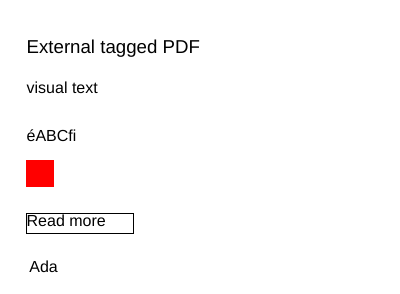
The fixture's red image contains one sample pixel but is painted at 20 PDF points on each side. The adapter follows its transformation matrix and derives 27 × 27 CSS pixels after rounding, using 96 CSS pixels per 72 PDF points. This preserves logical size without equating image samples with painted size or reproducing every PDF positioning/clipping operation.
The default profile exports no script runtime and permits no remote resource loads. Applications may explicitly supply rendering/authentication capabilities or enable trusted active content. The opt-in field/event bridge covers common validation, calculation and reset operations; it does not implement the complete Acrobat/ISO 21757-1 API. See the module's coverage matrix for the source classes, individual tests, independent HTML5/PDF oracle and Node runtime harness.
MathML fragments retain a checked vocabulary of 192 element names, including Presentation and Content MathML. Preserved Content/elementary markup does not guarantee native browser rendering; extended vocabulary produces a diagnostic, and the package supplies no rendering polyfill or mathematical evaluator.
See the module architecture, coverage and security guide for the model/file/runtime boundaries. Semantic HTML does not automatically certify accessibility or PDF/UA.
View the input PDF
This tagged PDF is the conversion input. The HTML result is produced by the script run during the site build; its preview preserves semantic structure rather than the PDF layout.
Use the browser PDF viewer
This viewer depends on your browser. If the document does not appear, use “Open the PDF” or “Download”.
Reader output
Actual script output from reading the input PDF while building this documentation. Download the console output.
{
    "input": "derive-html.pdf",
    "html": "derive-html.html",
    "htmlSha256": "5665b35850600e10e361dc3293b0e1f8ab81ebfec718ef3a829eecedf680d3fd",
    "cssBytes": 47,
    "assets": [
        {
            "filename": "image-b1ff9c8ea3a780bad09b346c423d2d0e46815926879b18e841d928376a946640.png",
            "mediaType": "image\/png",
            "sha256": "b1ff9c8ea3a780bad09b346c423d2d0e46815926879b18e841d928376a946640"
        }
    ],
    "diagnostics": [
        {
            "code": "scripts-disabled",
            "message": "PDF ECMAScript was not derived in the safe profile; use an explicitly trusted active-content profile for section 4.5 and Annex B.",
            "source": null
        },
        {
            "code": "associated-css-blocked",
            "message": "Associated stylesheets require an explicit active-content policy.",
            "source": "theme.css"
        }
    ]
}
HTML result
Actual derivation output, isolated in a frame without permission to run scripts, submit forms or navigate the parent page.
Read the HTML source
<!DOCTYPE html>
<html lang="fr-FR"><head><title>Independent tagged source</title><meta charset="UTF-8"><meta name="viewport" content="width=device-width, initial-scale=1"><style>.lead{margin-bottom:10.666667px;display:block}</style></head><body><nav hidden="" id="PDF-PageNavigation" role="doc-pagelist"><a href="#PDF-Page-1">Intro-i</a></nav><form name="acroform" id="acroform_id"></form><div id="pdf-se-1" data-pdf-se-type="Document" data-pdf-se-type-original="Document"><h1 id="heading" data-pdf-se-type="H1" data-pdf-se-type-original="CustomHeading"><span id="PDF-Page-1" role="doc-pagebreak" aria-label="Intro-i"></span>External tagged PDF</h1><p id="pdf-se-2" data-pdf-se-type="P" data-pdf-se-type-original="StyledP" class="lead" style="margin-bottom:10.666667px;display:block;text-align:center"><span lang="fr">Texte remplaçant</span></p><p id="pdf-se-3" data-pdf-se-type="P" data-pdf-se-type-original="P">éABCfi</p><figure id="pdf-se-4" data-pdf-se-type="Figure" data-pdf-se-type-original="Figure"><img src="data:image/png;base64,iVBORw0KGgoAAAANSUhEUgAAAAEAAAABCAIAAACQd1PeAAAADElEQVR4nGP4z8AAAAMBAQDJ/pLvAAAAAElFTkSuQmCC" width="27" height="27" alt="A red pixel"></figure><a id="pdf-se-5" data-pdf-se-type="Link" data-pdf-se-type-original="Link" href="#PDF-Page-1">Read more</a><input id="pdf-se-6" name="Person.Name" form="acroform_id" type="text" value="Ada" maxlength="50" spellcheck="true" required="" data-pdf-se-type="Form"></div></body></html>
Complete source code
Code from pdftoolkit/pdf-to-html · View the source at the documented commit ↗ · Input PDF source ↗
Read the commented script: 01-derive-tagged-pdf.php
<?php

declare(strict_types=1);

require dirname(__DIR__) . '/vendor/autoload.php';

use PDF\Html\PdfToHtml;
use PDF\Reading\FileBytes;
use PDF\Reading\ReaderLimits;

// File access belongs to this application, not to the library's source objects.
$input = $argv[1] ?? dirname(__DIR__) . '/tests/Fixtures/tagged.pdf';
$output = $argv[2] ?? dirname(__DIR__) . '/_build/derived.html';
if (!stream_is_local($input) || !is_file($input)) {
    throw new RuntimeException('The input must identify an existing local PDF file.');
}
$stream = fopen($input, 'rb');
if ($stream === false) {
    throw new RuntimeException('The input PDF could not be opened.');
}
try {
    $maximum = (new ReaderLimits())->maxFileBytes;
    $bytes = stream_get_contents($stream, $maximum + 1);
} finally {
    fclose($stream);
}
if ($bytes === false || strlen($bytes) > $maximum) {
    throw new RuntimeException('The input PDF exceeds the configured file limit.');
}

// Parsing, interpretation and derivation are separate injectable objects.
// The default profile performs no network access and emits no active scripts.
$result = (new PdfToHtml())->convert(new FileBytes($bytes), basename($input));
$directory = dirname($output);
if (!is_dir($directory) && !mkdir($directory, 0777, true) && !is_dir($directory)) {
    throw new RuntimeException('The output directory could not be created.');
}
if (file_put_contents($output, $result->html) === false) {
    throw new RuntimeException('The derived HTML could not be written.');
}
foreach ($result->assets as $asset) {
    if (file_put_contents($directory . '/' . $asset->filename, $asset->bytes) === false) {
        throw new RuntimeException('A derived asset could not be written.');
    }
}

echo json_encode([
    'input' => basename($input),
    'html' => basename($output),
    'htmlSha256' => hash('sha256', $result->html),
    'cssBytes' => strlen($result->css),
    'assets' => array_map(static fn ($asset): array => ['filename' => $asset->filename, 'mediaType' => $asset->mediaType, 'sha256' => hash('sha256', $asset->bytes)], $result->assets),
    'diagnostics' => $result->diagnostics,
], JSON_THROW_ON_ERROR | JSON_UNESCAPED_UNICODE | JSON_PRETTY_PRINT) . "\n";