The first lessons build a graph and write a PDF. This lesson opens an existing
file using the optional pdftoolkit/pdf-reader module and core at the published
versions selected by the source manifest.
It traverses the page tree, examines effective attributes and separately requests
stream decoding. Dictionaries, numbers and rectangles remain core objects.
The input PDF is an original fixture created with pypdf and qpdf independently of the PHP writer. The complete script belongs to the reader repository. On the site, its three pages, actual console output and commented code appear after the explanations.
Run the example
In a standalone application, install the reader from Packagist with core 0.5, then run the script distributed with the module:
composer require "roukmoute/pdf:^0.5.5" "pdftoolkit/pdf-reader:^0.1.6"
php vendor/pdftoolkit/pdf-reader/examples/pages.php vendor/pdftoolkit/pdf-reader/tests/Fixtures/page-tree/classic.pdf
From the core checkout prepared as described in the
tutorial index, composer install installs
the reader as a development dependency; the same PHP command works.
The first argument is an input file. The script writes no new PDF. To use the xref-stream and compressed-object variation:
php vendor/pdftoolkit/pdf-reader/examples/pages.php vendor/pdftoolkit/pdf-reader/tests/Fixtures/page-tree/object-streams.pdf
Object identifiers change in this variation, but page order and effective values remain the same. For a standalone application, the package guide explains how to install only the core and reader.
1. Open the document without traversing its pages
The application chooses the file and supplies its bytes:
use PDF\Reading\DocumentReader;
use PDF\Reading\FileBytes;

$document = (new DocumentReader())->read(new FileBytes($bytes));
DocumentReader checks the header, cross-references, revisions and catalog.
Its ReadDocument then resolves objects on demand, with caches and budgets
specific to that document. Opening it does not yet verify every page or resource.
2. Traverse and verify the tree
use PDF\Reading\PageTreeLimits;
use PDF\Reading\PageTreeReader;

$tree = (new PageTreeReader($document, new PageTreeLimits(
    maxDepth: 64,
    maxNodes: 10_000,
    maxPages: 5_000,
)))->read();
The catalog identifies a /Pages root. Branches have /Kids and /Count;
leaves are /Page dictionaries. Traversal follows /Kids order, checks /Parent
relationships and compares every declared count with the actual number of leaves
encountered. Cycles and repeated identities are rejected.
ReadPageTree is countable and iterable. count($tree) is three for this input;
$tree->page(0) returns the first page. Each ReadPage retains its owning document,
reference and source dictionary. Depth, node and leaf limits belong to this
traversal, in addition to document-loading budgets.
3. Distinguish written values from effective attributes
Four entries are inheritable: /Resources, /MediaBox, /CropBox and /Rotate.
The reader finds the closest ancestor defining them, then constructs the leaf's
PageAttributes. CropBox defaults to MediaBox; Rotate defaults to zero if no
ancestor or page defines it. Null is treated as absence.
| Page | Attribute origin and particular behavior | Raw rotation / orientation |
|---|---|---|
| 1 | Inherits Courier resources and both rectangles from its branch. | -90 / 270 |
| 2 | Defines MediaBox, zero rotation and empty resources; inherits CropBox from the sub-branch. | 0 / 0 |
| 3 | Inherits from the root without taking values from the previous branch. | 90 / 90 |
A local resource dictionary replaces the ancestor's dictionary as a whole:
categories are not merged. This is why the second page's empty resources use
no inherited font. Effective properties are a DictionaryType, two Rectangle
objects and an IntegerType. normalizedRotation() calculates orientation
without replacing the original integer. The source dictionary retains only local entries.
4. Examine content, then request decoding
/Contents is local and never inherited. It can designate a single stream or
an array of streams. A separate service resolves it:
use PDF\Reading\PageContentLimits;
use PDF\Reading\PageContentsReader;

$contentReader = new PageContentsReader($document, new PageContentLimits(
    maxStreams: 128,
));

foreach ($tree as $page) {
    $contents = $contentReader->read($page);
    foreach ($contents as $stream) {
        $encodedBytes = $stream->encodedBytes();
        $decodedBytes = $document->streamData($stream);
    }
}
PageContents retains EncodedStream objects separately in their order. This
service neither concatenates data nor applies filters. streamData() requests
decoding under ReadDocument's cumulative budgets; subsequent requests reuse its cache.
Pages have two, two and zero streams respectively. The first combines a raw
stream and a Flate stream. The second uses an indirect array, with one content
stream containing binary inline-image data. Those data even contain words such
as endstream: their presence does not end the stream, whose boundaries are
defined by /Length. The third page omits /Contents and yields an empty collection.
Understand the preview and console output
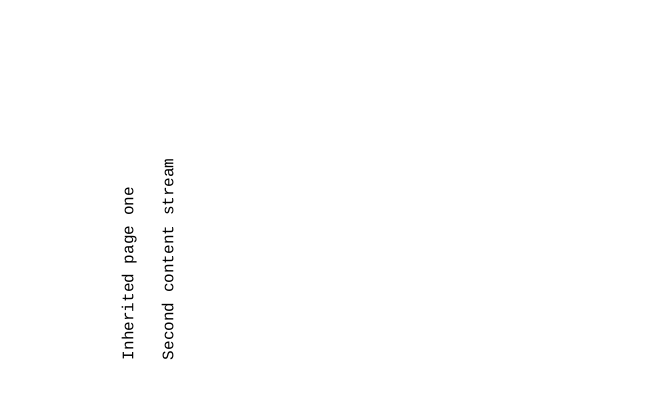
The first page displays two lines with the rotation inherited from its branch. The second appears blank: its inline image occupies a small area near the origin, outside CropBox. The third is blank because it has no content. This input tests structures and binary data; stream count does not predict how many visible elements a page contains.
Console output reports three verified pages, their effective rectangles, rotations and number of resource categories. For each stream it compares encoded and decoded lengths. These bytes remain PDF language: the reader does not interpret them to extract text or render a page. Site previews are produced independently with Poppler.
Try it
- Read
object-streams.pdfand compare its references with the traditional file's. - Reduce
maxPagesto two to see this three-page document rejected. - Examine
$tree->page(0)->dictionary->get('Rotate'), then its effective attribute: the first page writes no local rotation. - Keep streams encoded by omitting the
streamData()request.
Verification and limitations
The independent fixtures have expected values verified with pypdf and qpdf, then PHP tests. Documentation preserves the input bytes exactly, executes the locked module's script and renders its three pages.
Traversal does not validate every PDF resource, annotation or action. Encryption, hybrid references, PDF 2.0 and unimplemented codecs remain rejected. Importing into the writer, merging, rewriting, text extraction and rendering require dedicated mechanisms. The reader guide and its security checks describe responsibilities and budgets.
References: ISO 32000-1:2008, 7.7.3 and Tables 29–30 for trees, pages and inheritance; 7.8.2 for content streams; 7.9.5 for rectangles.
← 11. Incremental revisions · All tutorials
View the input PDF
This PDF is the reader input: an original fixture created with pypdf and qpdf, independently of the PHP writer. All three pages appear below, followed by the reader output.


Use the browser PDF viewer
This viewer depends on your browser. If the document does not appear, use “Open the PDF” or “Download”.
Reader output
Actual script output from reading the input PDF while building this documentation. Download the console output.
Verified pages: 3
Page 1 (14 0 R): MediaBox [0 0 300 500]; CropBox [20 30 280 470]; Rotate -90 (orientation 270); resource categories 2
  Content streams: 2
  Stream 1: 55 encoded bytes, 55 decoded bytes
  Stream 2: 64 encoded bytes, 58 decoded bytes
Page 2 (18 0 R): MediaBox [0 0 320 520]; CropBox [30 40 270 460]; Rotate 0 (orientation 0); resource categories 0
  Content streams: 2
  Stream 1: 337 encoded bytes, 337 decoded bytes
  Stream 2: 21 encoded bytes, 19 decoded bytes
Page 3 (19 0 R): MediaBox [0 0 400 600]; CropBox [10 20 390 580]; Rotate 90 (orientation 90); resource categories 2
  Content streams: 0
Complete source code
Code from pdftoolkit/pdf-reader · View the source at the documented commit ↗ · Input PDF source ↗
Read the commented script: pages.php
<?php

declare(strict_types=1);

use PDF\Reading\DocumentReader;
use PDF\Reading\FileBytes;
use PDF\Reading\PageContentLimits;
use PDF\Reading\PageContentsReader;
use PDF\Reading\PageTreeLimits;
use PDF\Reading\PageTreeReader;

$autoload = dirname(__DIR__) . '/vendor/autoload.php';
if (!is_file($autoload)) {
    // An installed package uses its application's autoloader.
    $autoload = dirname(__DIR__, 3) . '/autoload.php';
}
if (!is_file($autoload)) {
    throw new RuntimeException('Install the Composer dependencies before running this example.');
}
require $autoload;

// 1. The application chooses a local file. The reader receives only its bytes.
$path = $argv[1] ?? dirname(__DIR__) . '/tests/Fixtures/page-tree/classic.pdf';
if (str_contains($path, '://') || str_contains($path, "\0")) {
    throw new InvalidArgumentException('Choose a local PDF path.');
}
$bytes = file_get_contents($path);
if ($bytes === false) {
    throw new RuntimeException('Could not read the chosen PDF.');
}
$document = (new DocumentReader())->read(new FileBytes($bytes));

// 2. This operation traverses the entire tree: Count and Parent are checked,
//    Kids order is preserved, and the four inheritable attributes are resolved.
//    These limits bound indirect traversal independently of syntax depth.
$tree = (new PageTreeReader($document, new PageTreeLimits(maxDepth: 64, maxNodes: 10000, maxPages: 5000)))->read();
printf("Verified pages: %d\n", count($tree));
$contentReader = new PageContentsReader($document, new PageContentLimits(maxStreams: 128));
foreach ($tree as $index => $page) {
    // 3. Effective values are core objects. The source dictionary retains only
    //    its local entries; it is neither modified nor imported.
    printf(
        "Page %d (%s R): MediaBox %s; CropBox %s; Rotate %d (orientation %d); resource categories %d\n",
        $index + 1,
        $page->reference->identifier,
        $page->attributes->mediaBox,
        $page->attributes->cropBox,
        $page->attributes->rotate->integer(),
        $page->attributes->normalizedRotation(),
        count($page->attributes->resources),
    );

    // 4. Contents belongs only to this page. Inspection preserves separate
    //    streams in order, including their filters and encoded bytes.
    $contents = $contentReader->read($page);
    printf("  Content streams: %d\n", count($contents));
    foreach ($contents as $ordinal => $stream) {
        // Decoding is requested here under the document's cumulative budgets.
        // The resulting bytes remain PDF instructions, without text extraction.
        $decoded = $document->streamData($stream);
        printf("  Stream %d: %d encoded bytes, %d decoded bytes\n", $ordinal + 1, strlen($stream->encodedBytes()), strlen($decoded));
    }
}