Practical examples · Tutorial path
Goal and prerequisites
Draw a small table of five items with a dark header, alternating rows, a grid and two fonts. Layout remains in examples/table.php: the core receives PDF operator objects.
Read the pages and text and
graphics tutorials. Install dependencies with
composer install, then use PHP 8.3 or later and the extensions required by Composer.
Run and inspect
From the root of a core checkout:
php examples/table.php
php examples/table.php table-demo.pdf
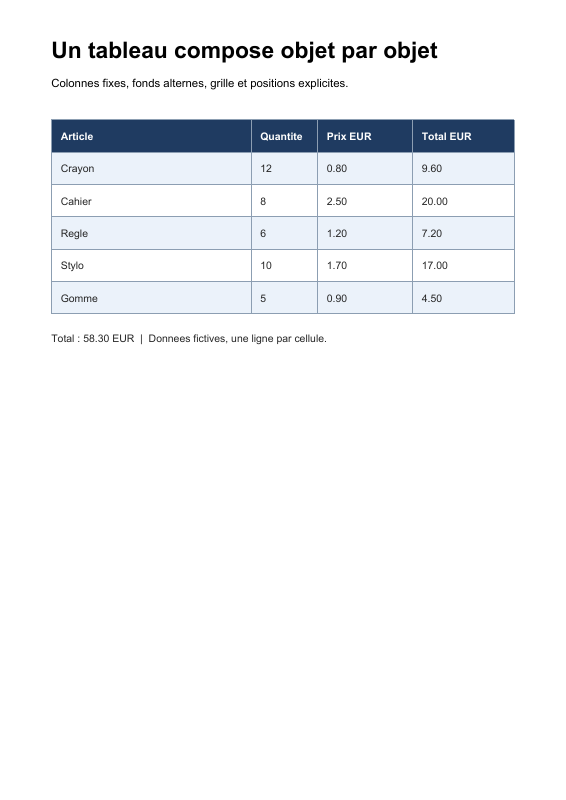
The first call produces examples/table.pdf. The result fits on one page,
with four columns and a total line below the grid. Data are fictional; monetary
values are preformatted demonstration strings.
What the script builds
The page is 595 units wide and 842 high. The table starts at x = 54, y = 716,
is 487 units wide and has six rows of 34 units, including the header. Its bottom
is therefore 716 - 6 × 34 = 512. With this example's page settings, one unit
is 1/72 inch; these values resemble typographic points.
| Step | Objects used | Purpose |
|---|---|---|
| Data and geometry | PHP arrays, widths and row height | Calculate drawing specific to this example |
| Resources | Two Type1Font objects, a /Font entry |
Select Helvetica and Helvetica-Bold through /F1 and /F2 |
| Backgrounds | SetNonstrokingRGBColor, AppendRectangle, FillPathNonzero |
Fill the header and alternating rows |
| Grid | SetStrokingRGBColor, SetLineWidth, MoveTo, LineTo, StrokePath |
Build every segment, then stroke them |
| Cells | BeginTextObject, SetTextFontAndSize, MoveTextPosition, ShowText, EndTextObject |
Explicitly position each line of text |
| File | ContentStreams, StreamObject, PageObject, DocumentCatalog, FileStructure |
Turn instructions into a PDF document |
PHP lists help calculate repeated elements. Resulting instructions remain
objects: every number is a NumericType, every resource name a NameType and
every string a LiteralString.
Color, paths and text
rg sets the fill color, also used for glyphs. The header first receives a dark
background; its text then receives a white fill. RG sets outline color, here
for the grid. Changing color draws nothing by itself.
AppendRectangle corresponds to re: its parameters are x, y, width, height.
After each background rectangle, FillPathNonzero (f) fills and ends the path.
Grid segments can share one path: each MoveTo (m) starts a subpath, each
LineTo (l) adds a segment, and the final StrokePath (S) strokes them.
For cells, y decreases while moving down the table. Horizontal offset 10 is
the chosen inner margin. Vertical offset 22 places the text baseline; it
does not measure glyph height. Each cell opens its own BT/ET, so its Td
starts from the identity text matrix rather than accumulating previous cells' movements.
Mapping to ISO 32000-1:2008
| Concept | Reference |
|---|---|
| Coordinate systems and units | §8.3.2 |
| Line width | §8.4.3.2 |
| Path construction and painting | §8.5.2 and §8.5.3 |
| Color operators | §8.6.8 |
| Type 1 fonts and standard fonts | §9.6.2 |
| Text state and positioning | §9.3 and §9.4 |
“Table” describes the visual result here. A semantic, accessible table requires additional PDF logical structure (§14.7), which this recipe does not build. The specification preserved in the core and architecture guide explain the framework for these objects.
Adapt the recipe
Adding a row to $rows extends the grid and moves the final note. Adjusting
$columnWidths moves separators and cell origins. $rowHeight changes backgrounds,
the grid and baselines together; reconsider the text offset if height becomes
too small. Changing RGB triples, whose components here range from 0 to 1,
changes the palette.
The recipe assumes all values fit on one line and one page. It does not measure glyphs, calculate amounts, align decimals, hyphenate or trigger page breaks. A layout library can calculate those decisions before producing the same core objects.
Back to practical examples · Review graphics operators
View the PDF result
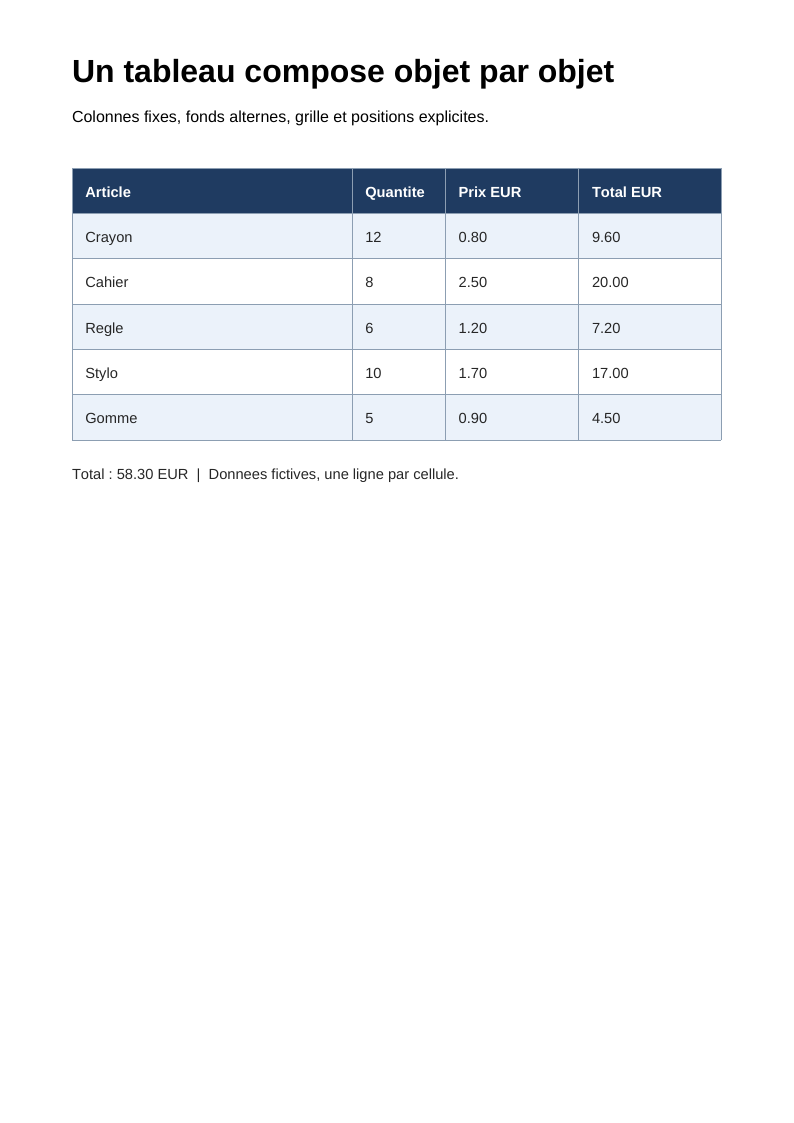
This file was generated with the code in this documentation. All pages appear below; open the PDF to use its links and bookmarks.
Use the browser PDF viewer
This viewer depends on your browser. If the document does not appear, use “Open the PDF” or “Download”.
Complete source code
Code from roukmoute/pdf · View the source at the documented commit ↗
Read the commented script: table.php
<?php

declare(strict_types=1);

use PDF\Document\Fonts\StandardFont;
use PDF\Document\Fonts\Type1Font;
use PDF\Document\ResourceDictionary;
use PDF\Document\Resources\Font;
use PDF\FileStructure;
use PDF\Syntax\ContentStreamsResources\ContentStreams;
use PDF\Syntax\ContentStreamsResources\Operator;
use PDF\Syntax\ContentStreamsResources\Operators\AppendRectangle;
use PDF\Syntax\ContentStreamsResources\Operators\BeginTextObject;
use PDF\Syntax\ContentStreamsResources\Operators\EndTextObject;
use PDF\Syntax\ContentStreamsResources\Operators\FillPathNonzero;
use PDF\Syntax\ContentStreamsResources\Operators\LineTo;
use PDF\Syntax\ContentStreamsResources\Operators\MoveTextPosition;
use PDF\Syntax\ContentStreamsResources\Operators\MoveTo;
use PDF\Syntax\ContentStreamsResources\Operators\SetLineWidth;
use PDF\Syntax\ContentStreamsResources\Operators\SetNonstrokingRGBColor;
use PDF\Syntax\ContentStreamsResources\Operators\SetStrokingRGBColor;
use PDF\Syntax\ContentStreamsResources\Operators\SetTextFontAndSize;
use PDF\Syntax\ContentStreamsResources\Operators\ShowText;
use PDF\Syntax\ContentStreamsResources\Operators\StrokePath;
use PDF\Syntax\DataStructure\Rectangle;
use PDF\Syntax\DocumentStructure\DocumentCatalog;
use PDF\Syntax\DocumentStructure\PageTree\PageObject;
use PDF\Syntax\DocumentStructure\PageTree\PageTreeNode;
use PDF\Syntax\FileStructure\FileBody;
use PDF\Syntax\FileStructure\FileHeader;
use PDF\Syntax\Object\DictionaryObject\Entry;
use PDF\Syntax\Object\DictionaryType;
use PDF\Syntax\Object\IndirectReference;
use PDF\Syntax\Object\NameType;
use PDF\Syntax\Object\NumericType;
use PDF\Syntax\Object\StreamObject;
use PDF\Syntax\Object\StringObject\LiteralString;

require dirname(__DIR__) . '/vendor/autoload.php';

// 1. PDF draws paths and text. This recipe calculates its cells
// in the script, then constructs each operator explicitly.
// All visible values are ASCII for the standard fonts used.
$rows = [
    ['Crayon', '12', '0.80', '9.60'],
    ['Cahier', '8', '2.50', '20.00'],
    ['Regle', '6', '1.20', '7.20'],
    ['Stylo', '10', '1.70', '17.00'],
    ['Gomme', '5', '0.90', '4.50'],
];
$headers = ['Article', 'Quantite', 'Prix EUR', 'Total EUR'];
$columnWidths = [210, 70, 100, 107];
$left = 54;
$top = 716;
$rowHeight = 34;
$tableWidth = array_sum($columnWidths);
$bottom = $top - (count($rows) + 1) * $rowHeight;

// 2. F1 and F2 are distinct resources. A Tf operator selects one
// or the other when drawing data or headers.
$regular = new Type1Font(StandardFont::Helvetica);
$bold = new Type1Font(StandardFont::HelveticaBold);
$resources = new ResourceDictionary(new Font(new DictionaryType(
    new Entry(new NameType('F1'), new IndirectReference($regular)),
    new Entry(new NameType('F2'), new IndirectReference($bold)),
)));

/** @var list<Operator> $operators */
$operators = [
    new BeginTextObject(),
    new SetTextFontAndSize(new NameType('F2'), new NumericType(24)),
    new MoveTextPosition(new NumericType($left), new NumericType(780)),
    new ShowText(new LiteralString('Un tableau compose objet par objet')),
    new SetTextFontAndSize(new NameType('F1'), new NumericType(12)),
    new MoveTextPosition(new NumericType(0), new NumericType(-30)),
    new ShowText(new LiteralString('Colonnes fixes, fonds alternes, grille et positions explicites.')),
    new EndTextObject(),
];

// 3. rg sets fill color. re constructs a rectangle; f fills it
// and ends the path. Finish this path before any text.
$operators[] = new SetNonstrokingRGBColor(new NumericType(0.12), new NumericType(0.23), new NumericType(0.38));
$operators[] = new AppendRectangle(new NumericType($left), new NumericType($top - $rowHeight), new NumericType($tableWidth), new NumericType($rowHeight));
$operators[] = new FillPathNonzero();
foreach ($rows as $index => $row) {
    if ($index % 2 === 0) {
        $operators[] = new SetNonstrokingRGBColor(new NumericType(0.92), new NumericType(0.95), new NumericType(0.98));
        $operators[] = new AppendRectangle(new NumericType($left), new NumericType($top - ($index + 2) * $rowHeight), new NumericType($tableWidth), new NumericType($rowHeight));
        $operators[] = new FillPathNonzero();
    }
}

// 4. RG and w set outlines. Each m/l pair adds a grid subpath;
// S strokes the whole path. y decreases while moving downwards.
$operators[] = new SetStrokingRGBColor(new NumericType(0.55), new NumericType(0.62), new NumericType(0.70));
$operators[] = new SetLineWidth(new NumericType(0.5));
$columnX = $left;
foreach ([0, ...$columnWidths] as $width) {
    $columnX += $width;
    $operators[] = new MoveTo(new NumericType($columnX), new NumericType($top));
    $operators[] = new LineTo(new NumericType($columnX), new NumericType($bottom));
}
for ($line = 0; $line <= count($rows) + 1; ++$line) {
    $lineY = $top - $line * $rowHeight;
    $operators[] = new MoveTo(new NumericType($left), new NumericType($lineY));
    $operators[] = new LineTo(new NumericType($left + $tableWidth), new NumericType($lineY));
}
$operators[] = new StrokePath();

// 5. Each cell opens its BT/ET text object: Td therefore starts from an
// identity matrix. The 10-point offset is our inner margin, and
// y identifies the letter baseline, not the top of the cell.
foreach ([$headers, ...$rows] as $rowIndex => $row) {
    $header = $rowIndex === 0;
    $component = $header ? 1 : 0.15;
    $operators[] = new SetNonstrokingRGBColor(new NumericType($component), new NumericType($component), new NumericType($component));
    $cellX = $left;
    foreach ($row as $columnIndex => $value) {
        $operators[] = new BeginTextObject();
        $operators[] = new SetTextFontAndSize(new NameType($header ? 'F2' : 'F1'), new NumericType(11));
        $operators[] = new MoveTextPosition(new NumericType($cellX + 10), new NumericType($top - $rowIndex * $rowHeight - 22));
        $operators[] = new ShowText(new LiteralString($value));
        $operators[] = new EndTextObject();
        $cellX += $columnWidths[$columnIndex];
    }
}
$operators[] = new BeginTextObject();
$operators[] = new SetTextFontAndSize(new NameType('F1'), new NumericType(11));
$operators[] = new MoveTextPosition(new NumericType($left), new NumericType($bottom - 30));
$operators[] = new ShowText(new LiteralString('Total : 58.30 EUR  |  Donnees fictives, une ligne par cellule.'));
$operators[] = new EndTextObject();

// 6. ContentStreams contains instructions; StreamObject contains bytes
// written in /Contents. The page and catalog assemble the graph.
$contents = new StreamObject(new ContentStreams(...$operators));
$page = new PageObject(
    new Rectangle(new NumericType(0), new NumericType(0), new NumericType(595), new NumericType(842)),
    $resources,
    $contents,
);
$pages = (new PageTreeNode())->addKid($page);
$catalog = new DocumentCatalog($pages);
$file = new FileStructure(new FileHeader('1.7'), new FileBody($catalog), new IndirectReference($catalog));
$path = $argv[1] ?? __DIR__ . '/table.pdf';
$file->writeTo($path);
echo $path . PHP_EOL;