The image tutorial constructs pixels directly. This lesson starts from encoded files: it separates importing them from their PDF representation and then their positioning. The example uses the core and image module at the published versions selected by the source manifest.
Reading these files belongs to the optional
pdftoolkit/pdf-images module. Samples,
DCT images and XObject streams belong to the core. composer install in the
core checkout installs the module for examples; an application installs it from
Packagist using composer require "pdftoolkit/pdf-images:^0.1.6". The
package guide also explains how to select the core release series.
- Complete example: image-files.php.
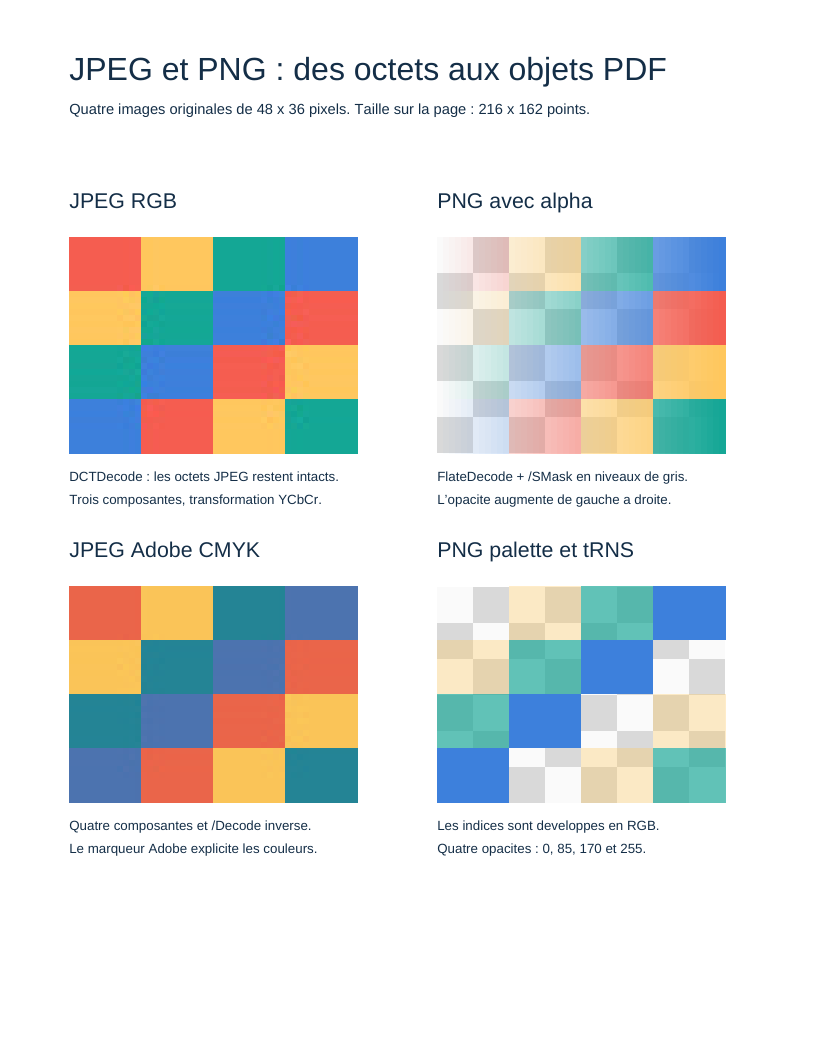
- Result: four images on a Letter page, with a checkerboard revealing transparency.
- Data: MIT-licensed synthetic patterns, distributed with the module in
vendor/pdftoolkit/pdf-images/examples/assets/images/. - Prerequisites: first document, drawing and images.
1. Supply bytes without delegating file access
ImageFileBytes represents the file's byte sequence. Importers receive no paths
and load no URLs. In this example, the application reads four known files from
its own resources, checks for read failure and constructs this object. A web
application decides how to authenticate and limit an upload before supplying its bytes.
use PDF\Images\ImageFileBytes;
use PDF\Images\ImageImportLimits;
use PDF\Images\JpegImageReader;
use PDF\Images\PngImageDecoder;

$limits = new ImageImportLimits(maxEncodedBytes: 1_048_576, maxPixels: 262_144);
$jpeg = (new JpegImageReader($limits))->read(new ImageFileBytes($jpegBytes));
$png = (new PngImageDecoder($limits))->decode(new ImageFileBytes($pngBytes));
Limits are objects specific to each importer. Defaults are 16 MiB encoded, 16 MiB decoded, 4,194,304 pixels, 32,768 pixels per dimension and 65,536 chunks or markers. PNG also counts filter bytes and expanded palette indices. These ceilings bound codec data; the PHP process also needs memory for temporary strings and the final document. Dimension products are checked before allocation.
2. JPEG: preserve the DCT representation
JpegImageReader checks the file's start and end, segment lengths, frame,
components, tables and scan headers. It accepts baseline and progressive 8-bit
Huffman DCT JPEG. It does not decode DCT coefficients or claim to check every
entropy-coded bit: that step belongs to the PDF reader. The encoded file remains unchanged.
The core's DCTImage result exposes dimensions, SampleLayout, color transform
and bytes. Grayscale uses /DeviceGray. RGB JPEG uses /DeviceRGB and an explicit
/ColorTransform: YCbCr for JFIF, or the Adobe marker's value. Without a marker,
only known component identifiers 1,2,3 or R,G,B are accepted.
CMYK requires an Adobe marker with transform 0. Adobe components are inverted,
so the dictionary contains /Decode [1 0 1 0 1 0 1 0]. YCCK, depths other than
8 bits, arithmetic coding, lossless frames and embedded ICC profiles are explicitly
rejected. EXIF metadata, including orientation, are not applied automatically.
3. PNG: reconstruct samples
PngImageDecoder checks the signature, framing, CRC, critical chunks, order of
IHDR, PLTE, tRNS, IDAT and IEND, and absence of data after the file ends.
Consecutive IDAT chunks form one zlib stream. Decompression is bounded by the
exact expected scanline length. Missing zlib endings, extra bytes and unknown
filters are rejected.
PngScanlineDecoder reconstructs the None, Sub, Up, Average and Paeth filters.
The result is a SampledImage: color ImageSamples and, when needed, opacity
ImageSamples. Each object describes dimensions, color space, depth and interleaved
bytes. Rows follow file order from the top of the image. Colors are not premultiplied
by alpha.
The decoder supports static non-interlaced 8-bit PNG: grayscale, RGB, palette,
gray with alpha and RGBA. Palette indices become RGB samples; tRNS becomes an
alpha channel, including color keys for gray and RGB PNG. Alpha 0 is transparent,
255 opaque.
Interlaced PNG, depths of 1, 2, 4 or 16 bits, APNG and ICC profiles are rejected. Gamma, chromaticity and sRGB indications are not transformed into calibrated PDF spaces: samples are represented in Device spaces. Other ancillary metadata are not imported into the PDF.
4. Compose the image XObject and its mask
use PDF\Document\Images\ImageXObjectFactory;

$factory = new ImageXObjectFactory();
$jpegStream = $factory->create($jpeg);
$pngStream = $factory->create($png);
The service composes a StreamObject with Table 89 entry objects: /Type /XObject,
/Subtype /Image, dimensions, color space and depth. JPEG uses EncodedData(DCTDecode);
PNG samples are compressed with FlateDecode. A different Flate compression
level can be injected per object.
ImageXObjectFactory is a core component. It receives explicit DCTImage or
SampledImage values; it parses no PNG or JPEG files. Another library or the
application can construct these objects without installing the module.
Alpha becomes another image stream, eight bits and /DeviceGray. An
IndirectReference under /SMask links it to the main image. The writer discovers
it in the graph and assigns its number without a global registry. The mask must
have matching dimensions; the constructor checks this.
This composition manages entries describing samples and masks: an additional
entry cannot replace /Width, /ColorSpace, /Decode or /SMask. Other choices,
such as /Interpolate, remain explicit entry objects. As with every stream,
StreamObject manages /Length, /Filter and /DecodeParms.
5. Reference and paint images
The service adds no page, resource or operator. The example constructs
/XObject << /JpegRGB … /PngRGBA … >> in the ResourceDictionary, then four
groups of q, cm, Do, Q. Matrices set a size of 216 × 162 points and the
position. The 48 × 36 pixel resolution therefore does not determine the PDF's physical size.
The checkerboard is drawn with rectangles and fills before the image. It remains
visible beneath partly transparent PNGs. The two JPEGs show the same pattern in
RGB and CMYK, allowing the direction of /Decode to be checked.
Run
php examples/image-files.php /tmp/image-files.pdf
qpdf --check /tmp/image-files.pdf
Tests compare reconstructed samples to original patterns and exercise the five filters, masks, CRCs, truncated lengths, invalid palette indices and excessive zlib data. The PDF result also needs an independent reader; syntax validation alone cannot confirm colors and opacity.
References: PNG, W3C, JPEG, ITU T.81 and ISO 32000-1, sections 7.4.8 and 8.9.
View the PDF result
This file was generated with the code in this documentation. All pages appear below; open the PDF to use its links and bookmarks.
Use the browser PDF viewer
This viewer depends on your browser. If the document does not appear, use “Open the PDF” or “Download”.
Complete source code
Code from roukmoute/pdf · View the source at the documented commit ↗
Read the commented script: image-files.php
<?php

declare(strict_types=1);

use PDF\Document\Fonts\StandardFont;
use PDF\Document\Fonts\Type1Font;
use PDF\Images\ImageFileBytes;
use PDF\Images\ImageImportLimits;
use PDF\Document\Images\ImageXObjectFactory;
use PDF\Images\JpegImageReader;
use PDF\Images\PngImageDecoder;
use PDF\Document\ResourceDictionary;
use PDF\Document\Resources\Font;
use PDF\Document\Resources\XObject;
use PDF\FileStructure;
use PDF\Graphics\CoordinateSystems\Matrix;
use PDF\Syntax\ContentStreamsResources\ContentStreams;
use PDF\Syntax\ContentStreamsResources\Operators\AppendRectangle;
use PDF\Syntax\ContentStreamsResources\Operators\BeginTextObject;
use PDF\Syntax\ContentStreamsResources\Operators\ConcatenateMatrix;
use PDF\Syntax\ContentStreamsResources\Operators\EndTextObject;
use PDF\Syntax\ContentStreamsResources\Operators\FillPathNonzero;
use PDF\Syntax\ContentStreamsResources\Operators\InvokeXObject;
use PDF\Syntax\ContentStreamsResources\Operators\MoveTextPosition;
use PDF\Syntax\ContentStreamsResources\Operators\RestoreGraphicsState;
use PDF\Syntax\ContentStreamsResources\Operators\SaveGraphicsState;
use PDF\Syntax\ContentStreamsResources\Operators\SetNonstrokingGray;
use PDF\Syntax\ContentStreamsResources\Operators\SetNonstrokingRGBColor;
use PDF\Syntax\ContentStreamsResources\Operators\SetTextFontAndSize;
use PDF\Syntax\ContentStreamsResources\Operators\ShowText;
use PDF\Syntax\DataStructure\Rectangle;
use PDF\Syntax\DocumentStructure\DocumentCatalog;
use PDF\Syntax\DocumentStructure\PageTree\PageObject;
use PDF\Syntax\DocumentStructure\PageTree\PageTreeNode;
use PDF\Syntax\FileStructure\FileBody;
use PDF\Syntax\FileStructure\FileHeader;
use PDF\Syntax\Object\DictionaryObject\Entry;
use PDF\Syntax\Object\DictionaryType;
use PDF\Syntax\Object\IndirectReference;
use PDF\Syntax\Object\NameType;
use PDF\Syntax\Object\NumericType;
use PDF\Syntax\Object\StreamObject;
use PDF\Syntax\Object\StringObject\LiteralString;

require dirname(__DIR__) . '/vendor/autoload.php';

// 1. The application chooses four known local files. Importers
//    receive only byte objects: no path or URL allows them to
//    open a resource. Repository patterns are MIT-licensed.
$files = [];
foreach (['rgb.jpg', 'rgba.png', 'cmyk.jpg', 'palette.png'] as $filename) {
    $bytes = file_get_contents(dirname(__DIR__) . '/vendor/pdftoolkit/pdf-images/examples/assets/images/' . $filename);
    if ($bytes === false) {
        throw new RuntimeException('The example image fixture could not be read.');
    }
    $files[$filename] = new ImageFileBytes($bytes);
}

// 2. These limits bound encoded data, pixels and decoded scanlines.
//    They are configured per object, for example for an upload endpoint.
$limits = new ImageImportLimits(
    maxEncodedBytes: 1_048_576,
    maxDecodedBytes: 1_048_576,
    maxPixels: 262_144,
    maxDimension: 1024,
);
$jpegReader = new JpegImageReader($limits);
$pngDecoder = new PngImageDecoder($limits);
$rgb = $jpegReader->read($files['rgb.jpg']);
$rgba = $pngDecoder->decode($files['rgba.png']);
$cmyk = $jpegReader->read($files['cmyk.jpg']);
$palette = $pngDecoder->decode($files['palette.png']);

// 3. Composition creates the /Subtype /Image streams from Table 89.
//    JPEG remains DCTDecode byte for byte. PNG is reconstructed, then
//    compressed with FlateDecode; its alpha becomes another /SMask stream.
//    Mask references are discovered through the writer's graph.
$factory = new ImageXObjectFactory();
$images = [
    'JpegRGB' => $factory->create($rgb),
    'PngRGBA' => $factory->create($rgba),
    'JpegCMYK' => $factory->create($cmyk),
    'PngPalette' => $factory->create($palette),
];
$imageEntries = [];
foreach ($images as $name => $image) {
    $imageEntries[] = new Entry(new NameType($name), new IndirectReference($image));
}
$helvetica = new Type1Font(StandardFont::Helvetica);
$resources = new ResourceDictionary(
    new Font(new DictionaryType(new Entry(new NameType('F1'), new IndirectReference($helvetica)))),
    new XObject(new DictionaryType(...$imageEntries)),
);

$operators = [
    new SetNonstrokingRGBColor(new NumericType(0.08), new NumericType(0.18), new NumericType(0.28)),
    new BeginTextObject(),
    new SetTextFontAndSize(new NameType('F1'), new NumericType(24)),
    new MoveTextPosition(new NumericType(52), new NumericType(732)),
    new ShowText(new LiteralString('JPEG et PNG : des octets aux objets PDF')),
    new SetTextFontAndSize(new NameType('F1'), new NumericType(11)),
    new MoveTextPosition(new NumericType(0), new NumericType(-26)),
    new ShowText(new LiteralString('Quatre images originales de 48 x 36 pixels. Taille sur la page : 216 x 162 points.')),
    new EndTextObject(),
];

// 4. Each PDF image occupies the unit square. The explicit matrix produces
//    a 216 × 162 rectangle, then translates it; there is no automatic placement.
//    A checkerboard behind images reveals both PNGs' alpha channels.
$panels = [
    ['JpegRGB', 52, 452, 'JPEG RGB', 'DCTDecode : les octets JPEG restent intacts.', 'Trois composantes, transformation YCbCr.'],
    ['PngRGBA', 328, 452, 'PNG avec alpha', 'FlateDecode + /SMask en niveaux de gris.', 'L\'opacite augmente de gauche a droite.'],
    ['JpegCMYK', 52, 190, 'JPEG Adobe CMYK', 'Quatre composantes et /Decode inverse.', 'Le marqueur Adobe explicite les couleurs.'],
    ['PngPalette', 328, 190, 'PNG palette et tRNS', 'Les indices sont developpes en RGB.', 'Quatre opacites : 0, 85, 170 et 255.'],
];
foreach ($panels as [$name, $x, $y, $title, $line1, $line2]) {
    $operators[] = new BeginTextObject();
    $operators[] = new SetTextFontAndSize(new NameType('F1'), new NumericType(16));
    $operators[] = new MoveTextPosition(new NumericType($x), new NumericType($y + 184));
    $operators[] = new ShowText(new LiteralString($title));
    $operators[] = new EndTextObject();
    for ($row = 0; $row < 6; ++$row) {
        for ($column = 0; $column < 8; ++$column) {
            $operators[] = new SetNonstrokingGray(new NumericType(($row + $column) % 2 === 0 ? 0.85 : 0.98));
            $operators[] = new AppendRectangle(new NumericType($x + $column * 27), new NumericType($y + $row * 27), new NumericType(27), new NumericType(27));
            $operators[] = new FillPathNonzero();
        }
    }
    $operators[] = new SaveGraphicsState();
    $operators[] = new ConcatenateMatrix(new Matrix(
        new NumericType(216),
        new NumericType(0),
        new NumericType(0),
        new NumericType(162),
        new NumericType($x),
        new NumericType($y),
    ));
    $operators[] = new InvokeXObject(new NameType($name));
    $operators[] = new RestoreGraphicsState();
    $operators[] = new SetNonstrokingRGBColor(new NumericType(0.08), new NumericType(0.18), new NumericType(0.28));
    $operators[] = new BeginTextObject();
    $operators[] = new SetTextFontAndSize(new NameType('F1'), new NumericType(10));
    $operators[] = new MoveTextPosition(new NumericType($x), new NumericType($y - 21));
    $operators[] = new ShowText(new LiteralString($line1));
    $operators[] = new MoveTextPosition(new NumericType(0), new NumericType(-17));
    $operators[] = new ShowText(new LiteralString($line2));
    $operators[] = new EndTextObject();
}

// 5. The document graph follows previous tutorials: resources, content,
//    page, page tree and catalog, all as explicit objects.
$contents = new StreamObject(new ContentStreams(...$operators));
$page = new PageObject(
    new Rectangle(new NumericType(0), new NumericType(0), new NumericType(612), new NumericType(792)),
    $resources,
    $contents,
);
$pages = (new PageTreeNode())->addKid($page);
$catalog = new DocumentCatalog($pages);
$file = new FileStructure(new FileHeader('1.7'), new FileBody($catalog), new IndirectReference($catalog));
$path = $argv[1] ?? __DIR__ . '/image-files.pdf';
$file->writeTo($path);
echo $path . PHP_EOL;