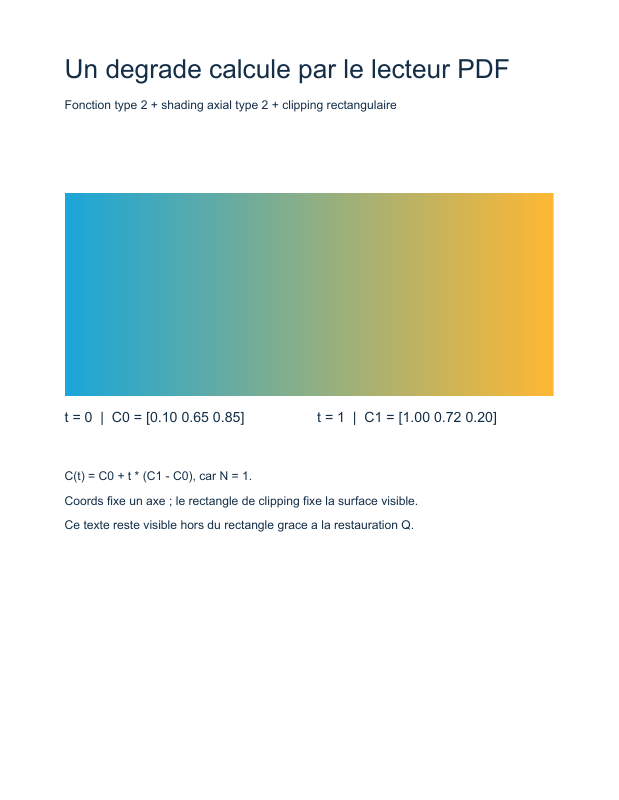
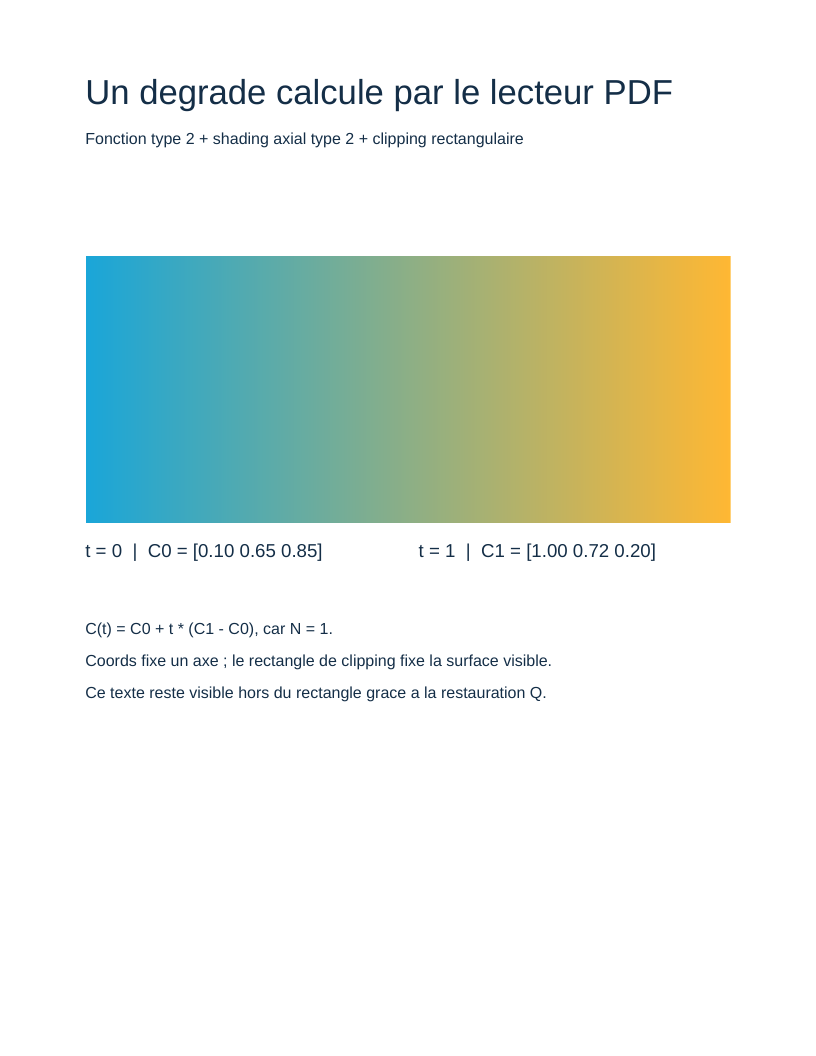
This example creates a rectangle transitioning from turquoise blue to orange. The PDF contains a type 2 function, a type 2 axial shading and a clipping path. The reader calculates gradient colors from these objects.
Run the example
From the root of a core checkout, after composer install:
php examples/gradient.php gradient.pdf
The output path is optional; it defaults to examples/gradient.pdf. See the complete script examples/gradient.php.
1. Define color as a function
ExponentialInterpolationFunction represents the type 2 PDF function. It receives a number t and returns three numbers here, the RGB components of a color:
C(t) = C0 + t^N × (C1 − C0)
Domain contains the input interval [0, 1]. C0 = [0.10, 0.65, 0.85] gives turquoise at the start; C1 = [1.00, 0.72, 0.20] gives orange at the end. Exponent N is 1, producing linear interpolation. At t = 0.5, the color is the average of the two colors.
Range contains three intervals [0, 1], one for each output component. The same immutable NumberInterval object is reused for these intervals. NumberArray gathers components while retaining each as a numeric object.
The function type describes the calculation. The shading type, also numbered 2 here, describes how to distribute that calculation's parameters across page space.
2. Build the axial shading
Type2ShadingDictionaryTable80 receives the common entries from Table 78 and axial-shading entries from Table 80:
| Entry | Example value | Role |
|---|---|---|
/ShadingType |
2 |
Select axial shading. |
/ColorSpace |
/DeviceRGB |
The function's three outputs are RGB components. |
/Coords |
[64 500 548 500] |
Connect start point (64, 500) to end point (548, 500). |
/Domain |
[0 1] |
Associate those points with t=0 and t=1. |
/Function |
Indirect reference to $function |
Calculate color for each parameter. |
/Extend |
[false false] |
Request no color extension beyond the axis endpoints. |
The axis is horizontal. Parameter t varies along it; color remains constant perpendicular to it. /Coords therefore does not define a rectangle by itself.
ShadingTypeEntry and ColorSpaceEntry carry Table 78 provenance. CoordsEntry, DomainEntry, FunctionEntry and ExtendEntry come from Table 80. This composition expresses both parts of the dictionary described by the specification.
3. Name the resource
The page resources' /Shading dictionary associates /Sh1 with an indirect reference to the shading dictionary. PaintShading(new NameType('Sh1')) produces /Sh1 sh and looks up this local resource.
The graph contains two distinct indirect objects: the shading and the function it references. The writer assigns their numbers while traversing the graph; the script never writes object numbers by hand.
4. Limit the painted area
The content stream encloses the gradient with these instructions:
q
64 400 484 200 re
W
n
/Sh1 sh
Q
qsaves the graphics state, including the current clipping path.recreates a rectangle at(64, 400), 484 points wide and 200 points high.Wrequests that this path become a clipping path using the nonzero rule.nends the path without painting it and applies the requested clipping.shpaints the shading in this area.Qrestores the previous graphics state.
Clipping gives the gradient its rectangular shape. Restoring the state lets explanations appear below, outside the rectangle: they would be hidden if clipping remained active.
Try it
- Change
Nfrom1to2: the axis and endpoint colors stay the same, but orange appears more gradually. - Position the
/Coordsendpoints vertically to change the direction of variation. - Change the clipping rectangle while retaining
/Coordsto distinguish geometry from color parameterization. - Shorten the axis and compare
/Extend [false false]with[true true]inside the same rectangle.
Things to know
The script handles an axial /DeviceRGB shading with a function having one input and three outputs. It does not cover radial shadings, meshes, transparency or ICC profiles.
Entry classes check the types described by their tables. The example's construction also respects semantic relationships: four coordinates, three function outputs for RGB, a compatible domain and two extension booleans. Generated classes alone do not guarantee all these relationships in an arbitrary assembly.
References in ISO 32000-1:2008: 7.10.3 and Table 40 (type 2 function), 8.4.2 (graphics state), 8.5.4 (clipping), 8.7.4.3 and Table 78 (shading and sh), 8.7.4.5.3 and Table 80 (axial shading).
← 6. Images · All tutorials · 8. Object streams →
View the PDF result
This file was generated with the code in this documentation. All pages appear below; open the PDF to use its links and bookmarks.
Use the browser PDF viewer
This viewer depends on your browser. If the document does not appear, use “Open the PDF” or “Download”.
Complete source code
Code from roukmoute/pdf · View the source at the documented commit ↗
Read the commented script: gradient.php
<?php

declare(strict_types=1);

use PDF\Document\Fonts\StandardFont;
use PDF\Document\Fonts\Type1Font;
use PDF\Document\ResourceDictionary;
use PDF\Document\Resources\Font;
use PDF\Document\Resources\Shading;
use PDF\FileStructure;
use PDF\Functions\Domain;
use PDF\Functions\ExponentialInterpolationFunction;
use PDF\Functions\NumberArray;
use PDF\Functions\NumberInterval;
use PDF\Functions\Range;
use PDF\Specification\Dictionary\ShadingDictionaryTable78\ColorSpaceEntry;
use PDF\Specification\Dictionary\ShadingDictionaryTable78\ShadingTypeEntry;
use PDF\Specification\Dictionary\Type2ShadingDictionaryTable80;
use PDF\Specification\Dictionary\Type2ShadingDictionaryTable80\CoordsEntry;
use PDF\Specification\Dictionary\Type2ShadingDictionaryTable80\DomainEntry;
use PDF\Specification\Dictionary\Type2ShadingDictionaryTable80\ExtendEntry;
use PDF\Specification\Dictionary\Type2ShadingDictionaryTable80\FunctionEntry;
use PDF\Syntax\ContentStreamsResources\ContentStreams;
use PDF\Syntax\ContentStreamsResources\Operators\AppendRectangle;
use PDF\Syntax\ContentStreamsResources\Operators\BeginTextObject;
use PDF\Syntax\ContentStreamsResources\Operators\ClipPathNonzero;
use PDF\Syntax\ContentStreamsResources\Operators\EndPath;
use PDF\Syntax\ContentStreamsResources\Operators\EndTextObject;
use PDF\Syntax\ContentStreamsResources\Operators\MoveTextPosition;
use PDF\Syntax\ContentStreamsResources\Operators\PaintShading;
use PDF\Syntax\ContentStreamsResources\Operators\RestoreGraphicsState;
use PDF\Syntax\ContentStreamsResources\Operators\SaveGraphicsState;
use PDF\Syntax\ContentStreamsResources\Operators\SetNonstrokingRGBColor;
use PDF\Syntax\ContentStreamsResources\Operators\SetTextFontAndSize;
use PDF\Syntax\ContentStreamsResources\Operators\ShowText;
use PDF\Syntax\DataStructure\Rectangle;
use PDF\Syntax\DocumentStructure\DocumentCatalog;
use PDF\Syntax\DocumentStructure\PageTree\PageObject;
use PDF\Syntax\DocumentStructure\PageTree\PageTreeNode;
use PDF\Syntax\FileStructure\FileBody;
use PDF\Syntax\FileStructure\FileHeader;
use PDF\Syntax\Object\ArrayType;
use PDF\Syntax\Object\BooleanType;
use PDF\Syntax\Object\DictionaryObject\Entry;
use PDF\Syntax\Object\DictionaryType;
use PDF\Syntax\Object\IndirectReference;
use PDF\Syntax\Object\IntegerType;
use PDF\Syntax\Object\NameType;
use PDF\Syntax\Object\NumericType;
use PDF\Syntax\Object\StreamObject;
use PDF\Syntax\Object\StringObject\LiteralString;

require dirname(__DIR__) . '/vendor/autoload.php';

// 1. The type 2 PDF function receives a parameter t in [0, 1] and returns
//    three RGB components. With N=1, C(t)=C0+t*(C1-C0) is linear.
//    Range explicitly defines three output intervals, one per component.
$unitInterval = new NumberInterval(new NumericType(0), new NumericType(1));
$domain = new Domain($unitInterval);
$function = new ExponentialInterpolationFunction(
    $domain,
    new NumericType(1),
    new NumberArray(new NumericType(0.10), new NumericType(0.65), new NumericType(0.85)),
    new NumberArray(new NumericType(1.00), new NumericType(0.72), new NumericType(0.20)),
    new Range($unitInterval, $unitInterval, $unitInterval),
);

// 2. /ShadingType 2 is an axial gradient. /Coords describes its endpoints
//    in page coordinates: [64 500 548 500]. On the left t=0,
//    on the right t=1; color remains constant perpendicular to the axis.
//    Common entries come from Table 78, specific entries from Table 80.
//    The function remains an indirect object distinct from the shading dictionary.
$shading = new Type2ShadingDictionaryTable80(
    new ShadingTypeEntry(new IntegerType(2)),
    new ColorSpaceEntry(new NameType('DeviceRGB')),
    new CoordsEntry(new NumberArray(
        new NumericType(64),
        new NumericType(500),
        new NumericType(548),
        new NumericType(500),
    )),
    new DomainEntry($domain),
    new FunctionEntry(new IndirectReference($function)),
    new ExtendEntry(new ArrayType(new BooleanType(false), new BooleanType(false))),
);

// 3. /Shading associates local name /Sh1 with this dictionary. The sh operator
//    will invoke this resource; no bitmap or colored bands are created.
$helvetica = new Type1Font(StandardFont::Helvetica);
$resources = new ResourceDictionary(
    new Font(new DictionaryType(
        new Entry(new NameType('F1'), new IndirectReference($helvetica)),
    )),
    new Shading(new DictionaryType(
        new Entry(new NameType('Sh1'), new IndirectReference($shading)),
    )),
);

// 4. Shading fills its area within the current clipping path. re creates
//    a rectangle; W requests using it as the clipping area; n ends the
//    path without painting and applies clipping. q/Q limit its effect
//    to the gradient: subsequent text returns to the page clipping path.
$contents = new StreamObject(new ContentStreams(
    new SetNonstrokingRGBColor(new NumericType(0.08), new NumericType(0.18), new NumericType(0.28)),
    new BeginTextObject(),
    new SetTextFontAndSize(new NameType('F1'), new NumericType(26)),
    new MoveTextPosition(new NumericType(64), new NumericType(714)),
    new ShowText(new LiteralString('Un degrade calcule par le lecteur PDF')),
    new SetTextFontAndSize(new NameType('F1'), new NumericType(12)),
    new MoveTextPosition(new NumericType(0), new NumericType(-30)),
    new ShowText(new LiteralString('Fonction type 2 + shading axial type 2 + clipping rectangulaire')),
    new EndTextObject(),
    new SaveGraphicsState(),
    new AppendRectangle(new NumericType(64), new NumericType(400), new NumericType(484), new NumericType(200)),
    new ClipPathNonzero(),
    new EndPath(),
    new PaintShading(new NameType('Sh1')),
    new RestoreGraphicsState(),
    new BeginTextObject(),
    new SetTextFontAndSize(new NameType('F1'), new NumericType(14)),
    new MoveTextPosition(new NumericType(64), new NumericType(374)),
    new ShowText(new LiteralString('t = 0  |  C0 = [0.10 0.65 0.85]')),
    new MoveTextPosition(new NumericType(250), new NumericType(0)),
    new ShowText(new LiteralString('t = 1  |  C1 = [1.00 0.72 0.20]')),
    new SetTextFontAndSize(new NameType('F1'), new NumericType(12)),
    new MoveTextPosition(new NumericType(-250), new NumericType(-58)),
    new ShowText(new LiteralString('C(t) = C0 + t * (C1 - C0), car N = 1.')),
    new MoveTextPosition(new NumericType(0), new NumericType(-24)),
    new ShowText(new LiteralString('Coords fixe un axe ; le rectangle de clipping fixe la surface visible.')),
    new MoveTextPosition(new NumericType(0), new NumericType(-24)),
    new ShowText(new LiteralString('Ce texte reste visible hors du rectangle grace a la restauration Q.')),
    new EndTextObject(),
));

// 5. The same document graph as in other tutorials produces the file.
//    Indirect references are numbered during serialization.
$page = new PageObject(
    new Rectangle(new NumericType(0), new NumericType(0), new NumericType(612), new NumericType(792)),
    $resources,
    $contents,
);
$pages = (new PageTreeNode())->addKid($page);
$catalog = new DocumentCatalog($pages);
$file = new FileStructure(new FileHeader('1.7'), new FileBody($catalog), new IndirectReference($catalog));
$path = $argv[1] ?? __DIR__ . '/gradient.pdf';
$file->writeTo($path);
echo $path . PHP_EOL;