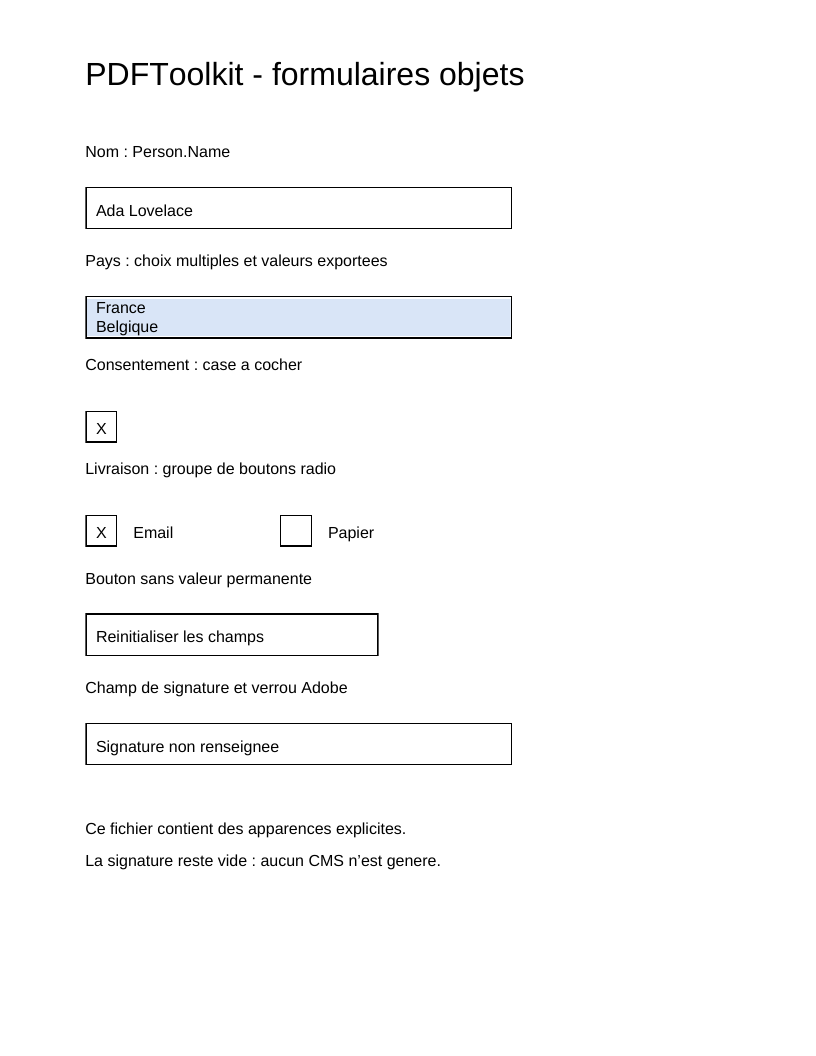
Le script complet produit une page avec un nom, une liste de pays, une case à cocher, des boutons radio, un bouton de réinitialisation et un champ de signature vide.
php examples/acroform-fields.php acroform-fields.pdf
FieldTree porte les valeurs héritées : ressource Helvetica, apparence textuelle
par défaut et alignement. NonTerminalField crée le groupe Person ; ses enfants
ont des noms partiels. Le nom complet Person.Name résulte de l'arbre.
La valeur /V et l'apparence /AP ont des fonctions différentes. La première
décrit la donnée ; la seconde est un XObject Form qui dessine le widget avec sa
propre BBox et ses ressources. Changer la valeur ne recalcule pas l'apparence :
fournir une nouvelle apparence ou choisir explicitement NeedAppearances.
Le texte modifiable des champs /Tx et /Ch est entouré d'une séquence
/Tx BMC ... EMC. Le nom de ce marqueur reste Tx, même pour une liste de type
Ch. Un lecteur remplace cette seule séquence lors de la saisie ; le cadre reste
à l'extérieur. Sans marqueur, la procédure ISO ajoute le nouveau texte à la fin
du flux et conserve l'ancien dessin, ce qui peut produire une superposition dans
Acrobat Reader.
Le script compose cette séquence avec des objets BeginMarkedContent,
SaveGraphicsState, BeginTextObject, EndTextObject, RestoreGraphicsState
et EndMarkedContent. Le clipping est aussi à l'intérieur : il est restauré
avec Q et peut être remplacé avec le texte. Les apparences de boutons et de
signature restent des dessins distincts ; elles ne demandent pas ce marqueur
de texte variable.
WidgetAnnotation relie un champ à son rectangle dans la page. Le champ énumère
ses widgets dans /Kids, chaque widget revient à son /Parent, et la page les
référence dans /Annots. Le writer vérifie leur appartenance au catalogue réel.
Une case à cocher possède les apparences /Off et /Yes ; /AS choisit l'état.
La liste distingue les libellés affichés des valeurs exportées.
ChoiceValueDomain::ExportValues rend le choix explicite, certaines formulations
ISO étant ambiguës ; /I conserve les indices sélectionnés dans /Opt.
L'apparence initiale dessine France et Belgique sur deux lignes, avec les deux
sélections dans la séquence variable. Elle ne dessine pas les codes exportés
FR et BE, qui appartiennent aux données du champ.
Modifier valeurs, options, rectangles ou états dans le script permet d'observer chaque lien. Le champ de signature reste vide ici ; le tutoriel 20 réalise une signature. Les codecs barcode, les scripts et l'exécution XFA demandent leurs propres moteurs.
Référence : ISO 12.7, pages physiques 438–473 ; texte variable et procédure de
remplacement §12.7.3.3, pages 443–444. Supplément Adobe pages 42–48 et page 121,
notes 118–119 : sans /MK, Acrobat conserve le contenu hors de la séquence
/Tx. La présence de /MK demande une régénération complète de l'apparence ;
elle n'est pas nécessaire pour les apparences personnalisées de ce script.
Voir le résultat PDF
Ce fichier a été généré avec le code de cette documentation. Toutes ses pages sont reproduites ci-dessous ; ouvrir le PDF pour utiliser ses liens et ses signets.
Utiliser le lecteur PDF du navigateur
Ce lecteur dépend du navigateur. Si le document ne s’affiche pas, utiliser « Ouvrir le PDF » ou « Télécharger ».
Code source complet
Code de roukmoute/pdf · Consulter la source au commit documenté ↗
Lire le script commenté : acroform-fields.php
<?php

declare(strict_types=1);

use PDF\Document\Extensions\DeveloperExtension;
use PDF\Document\Extensions\DeveloperExtensionEntry;
use PDF\Document\Extensions\DeveloperExtensions;
use PDF\Document\Extensions\DeveloperPrefix;
use PDF\Document\Fonts\StandardFont;
use PDF\Document\Fonts\Type1Font;
use PDF\Document\Forms\AcroForm;
use PDF\Document\Forms\AppearanceState;
use PDF\Document\Forms\AppearanceStates;
use PDF\Document\Forms\ButtonField;
use PDF\Document\Forms\ButtonFieldFlag;
use PDF\Document\Forms\ChoiceField;
use PDF\Document\Forms\ChoiceFieldFlag;
use PDF\Document\Forms\ChoiceOption;
use PDF\Document\Forms\ChoiceOptions;
use PDF\Document\Forms\ChoiceSelection;
use PDF\Document\Forms\ChoiceFieldValue;
use PDF\Document\Forms\ChoiceValueDomain;
use PDF\Document\Forms\DefaultAppearance;
use PDF\Document\Forms\TextFieldFlags;
use PDF\Document\Forms\ChoiceFieldFlags;
use PDF\Document\Forms\ButtonFieldFlags;
use PDF\Document\Forms\FieldTree;
use PDF\Document\Forms\FormAppearanceStream;
use PDF\Document\Forms\NonTerminalField;
use PDF\Document\Forms\PartialFieldName;
use PDF\Document\Forms\SignatureField;
use PDF\Document\Forms\SignatureFieldLock;
use PDF\Document\Forms\SignatureLockAction;
use PDF\Document\Forms\TextField;
use PDF\Document\Forms\WidgetAnnotation;
use PDF\Document\Forms\WidgetAppearance;
use PDF\Document\ResourceDictionary;
use PDF\Document\Resources\Font;
use PDF\FileStructure;
use PDF\Specification\Dictionary\ResetFormActionTable238;
use PDF\Syntax\ContentStreamsResources\ContentStreams;
use PDF\Syntax\ContentStreamsResources\Operators\AppendRectangle;
use PDF\Syntax\ContentStreamsResources\Operators\BeginMarkedContent;
use PDF\Syntax\ContentStreamsResources\Operators\BeginTextObject;
use PDF\Syntax\ContentStreamsResources\Operators\ClipPathNonzero;
use PDF\Syntax\ContentStreamsResources\Operators\EndMarkedContent;
use PDF\Syntax\ContentStreamsResources\Operators\EndPath;
use PDF\Syntax\ContentStreamsResources\Operators\EndTextObject;
use PDF\Syntax\ContentStreamsResources\Operators\FillPathNonzero;
use PDF\Syntax\ContentStreamsResources\Operators\MoveTextPosition;
use PDF\Syntax\ContentStreamsResources\Operators\RestoreGraphicsState;
use PDF\Syntax\ContentStreamsResources\Operators\SaveGraphicsState;
use PDF\Syntax\ContentStreamsResources\Operators\SetLineWidth;
use PDF\Syntax\ContentStreamsResources\Operators\SetNonstrokingGray;
use PDF\Syntax\ContentStreamsResources\Operators\SetNonstrokingRGBColor;
use PDF\Syntax\ContentStreamsResources\Operators\SetTextFontAndSize;
use PDF\Syntax\ContentStreamsResources\Operators\ShowText;
use PDF\Syntax\ContentStreamsResources\Operators\StrokePath;
use PDF\Syntax\DataStructure\Rectangle;
use PDF\Syntax\DataStructure\TextString;
use PDF\Syntax\DocumentStructure\CatalogDictionary\AcroForm as AcroFormEntry;
use PDF\Syntax\DocumentStructure\CatalogDictionary\Extensions;
use PDF\Syntax\DocumentStructure\DocumentCatalog;
use PDF\Syntax\DocumentStructure\PageTree\PageObject;
use PDF\Syntax\DocumentStructure\PageTree\PageTreeNode;
use PDF\Syntax\FileStructure\FileBody;
use PDF\Syntax\FileStructure\FileHeader;
use PDF\Syntax\Object\ArrayType;
use PDF\Syntax\Object\DictionaryObject\Entry;
use PDF\Syntax\Object\DictionaryType;
use PDF\Syntax\Object\IndirectReference;
use PDF\Syntax\Object\IntegerType;
use PDF\Syntax\Object\NameType;
use PDF\Syntax\Object\NumericType;
use PDF\Syntax\Object\StreamObject;
use PDF\Syntax\Object\StringObject\LiteralString;

require dirname(__DIR__) . '/vendor/autoload.php';

// Each text value, font, resource, field and appearance is supplied explicitly.
// The AcroForm performs no automatic layout or font measurement.
$font = new Type1Font(StandardFont::Helvetica);
$resources = new ResourceDictionary(new Font(new DictionaryType(new Entry(new NameType('Helv'), new IndirectReference($font)))));
$default = new DefaultAppearance(new SetTextFontAndSize(new NameType('Helv'), new NumericType(12)), new SetNonstrokingGray(new NumericType(0)));
$tree = new FieldTree($default, $resources);
$person = new NonTerminalField(new PartialFieldName(new TextString('Person')));
$name = new TextField(new PartialFieldName(new TextString('Name')), value: new TextString('Ada Lovelace'), maximumLength: new IntegerType(40));
$countries = new ChoiceField(
    new PartialFieldName(new TextString('Countries')),
    new ChoiceOptions(new ChoiceOption(new TextString('France'), new TextString('FR')), new ChoiceOption(new TextString('Belgique'), new TextString('BE'))),
    new ChoiceFieldFlags(ChoiceFieldFlag::MultiSelect),
    // The /V interpretation is explicit: export values, as used by common
    // readers; the ISO prose on p.454 also mentions display names.
    new ChoiceFieldValue(ChoiceValueDomain::ExportValues, new ArrayType(new TextString('FR'), new TextString('BE'))),
    new ChoiceSelection(new IntegerType(0), new IntegerType(1)),
);
$consent = new ButtonField(new PartialFieldName(new TextString('Consent')), value: new NameType('Yes'));
$delivery = new ButtonField(new PartialFieldName(new TextString('Delivery')), new ButtonFieldFlags(ButtonFieldFlag::Radio), new NameType('Email'));
$reset = new ButtonField(new PartialFieldName(new TextString('Reset')), new ButtonFieldFlags(ButtonFieldFlag::Pushbutton));
$signature = new SignatureField(new PartialFieldName(new TextString('Signature')), lock: new SignatureFieldLock(SignatureLockAction::All, permissions: new IntegerType(2)));
$person->addField($name)->addField($countries)->addField($consent)->addField($delivery)->addField($reset)->addField($signature);
$tree->addRoot($person);

// An appearance is a Form XObject whose BBox is local to the widget. Visible
// bytes are distinct from /V: changing a value requires a new AP,
// or an explicit NeedAppearances request to the reader. AP is supplied here.
// The frame remains static. For /Tx and /Ch, /Tx BMC ... EMC tells
// readers what to REPLACE during editing (ISO 12.7.3.3, p.444).
// Without this section, Acrobat adds text and retains the old drawing.
$drawAppearance = static function (ContentStreams $contents, int $width, int $height) use ($resources): FormAppearanceStream {
    return new FormAppearanceStream(new ContentStreams(
        new SetLineWidth(new NumericType(1)),
        new AppendRectangle(new NumericType(0.5), new NumericType(0.5), new NumericType($width - 1), new NumericType($height - 1)),
        new StrokePath(),
        ...$contents->operators,
    ), new Rectangle(new NumericType(0), new NumericType(0), new NumericType($width), new NumericType($height)), $resources);
};
$label = static fn (string $text, int $height): ContentStreams => new ContentStreams(
    new BeginTextObject(),
    new SetTextFontAndSize(new NameType('Helv'), new NumericType(12)),
    new SetNonstrokingGray(new NumericType(0)),
    new MoveTextPosition(new NumericType(8), new NumericType(($height - 12) / 2)),
    new ShowText(new LiteralString($text)),
    new EndTextObject(),
);
$rectangle = static fn (int $x, int $y, int $width, int $height): Rectangle => new Rectangle(new NumericType($x), new NumericType($y), new NumericType($x + $width), new NumericType($y + $height));
$print = new Entry(new NameType('F'), new IntegerType(4));
$nameAppearance = $drawAppearance(new ContentStreams(...[
    new BeginMarkedContent(new NameType('Tx')),
    new SaveGraphicsState(),
    new AppendRectangle(new NumericType(1), new NumericType(1), new NumericType(318), new NumericType(30)),
    new ClipPathNonzero(),
    new EndPath(),
    ...$label('Ada Lovelace', 32)->operators,
    new RestoreGraphicsState(),
    new EndMarkedContent(),
]), 320, 32);
// A list draws its /Opt labels line by line and both /I selections.
// Export values FR/BE remain exclusively /V data.
// Highlighting and lines are all inside the replaceable variable section.
$countryAppearance = $drawAppearance(new ContentStreams(
    new BeginMarkedContent(new NameType('Tx')),
    new SaveGraphicsState(),
    new AppendRectangle(new NumericType(1), new NumericType(1), new NumericType(318), new NumericType(30)),
    new ClipPathNonzero(),
    new EndPath(),
    new SetNonstrokingRGBColor(new NumericType(0.85), new NumericType(0.9), new NumericType(0.97)),
    new AppendRectangle(new NumericType(1), new NumericType(16), new NumericType(318), new NumericType(14)),
    new FillPathNonzero(),
    new AppendRectangle(new NumericType(1), new NumericType(2), new NumericType(318), new NumericType(14)),
    new FillPathNonzero(),
    new BeginTextObject(),
    new SetTextFontAndSize(new NameType('Helv'), new NumericType(12)),
    new SetNonstrokingGray(new NumericType(0)),
    new MoveTextPosition(new NumericType(8), new NumericType(19)),
    new ShowText(new LiteralString('France')),
    new MoveTextPosition(new NumericType(0), new NumericType(-14)),
    new ShowText(new LiteralString('Belgique')),
    new EndTextObject(),
    new RestoreGraphicsState(),
    new EndMarkedContent(),
), 320, 32);
$nameWidget = new WidgetAnnotation($rectangle(64, 620, 320, 32), new WidgetAppearance($nameAppearance), null, $print);
$countryWidget = new WidgetAnnotation($rectangle(64, 538, 320, 32), new WidgetAppearance($countryAppearance), null, $print);

// Buttons: /V names the selected state. Each widget retains its own
// /AS and both /Off and /Yes appearances (or Email/Paper for radio buttons).
$checkboxAppearances = new AppearanceStates(new AppearanceState(new NameType('Off'), $drawAppearance($label('', 24), 24, 24)), new AppearanceState(new NameType('Yes'), $drawAppearance($label('X', 24), 24, 24)));
$consentWidget = new WidgetAnnotation($rectangle(64, 460, 24, 24), new WidgetAppearance($checkboxAppearances), new NameType('Yes'), $print);
$emailAppearances = new AppearanceStates(new AppearanceState(new NameType('Off'), $drawAppearance($label('', 24), 24, 24)), new AppearanceState(new NameType('Email'), $drawAppearance($label('X', 24), 24, 24)));
$paperAppearances = new AppearanceStates(new AppearanceState(new NameType('Off'), $drawAppearance($label('', 24), 24, 24)), new AppearanceState(new NameType('Paper'), $drawAppearance($label('X', 24), 24, 24)));
$emailWidget = new WidgetAnnotation($rectangle(64, 382, 24, 24), new WidgetAppearance($emailAppearances), new NameType('Email'), $print);
$paperWidget = new WidgetAnnotation($rectangle(210, 382, 24, 24), new WidgetAppearance($paperAppearances), new NameType('Off'), $print);
$resetWidget = new WidgetAnnotation($rectangle(64, 300, 220, 32), new WidgetAppearance($drawAppearance($label('Reinitialiser les champs', 32), 220, 32)), null, $print, new Entry(new NameType('A'), new ResetFormActionTable238(new Entry(new NameType('S'), new NameType('ResetForm')))));
$signatureWidget = new WidgetAnnotation($rectangle(64, 218, 320, 32), new WidgetAppearance($drawAppearance($label('Signature non renseignee', 32), 320, 32)), null, $print);
$name->addWidget($nameWidget);
$countries->addWidget($countryWidget);
$consent->addWidget($consentWidget);
$delivery->addWidget($emailWidget)->addWidget($paperWidget);
$reset->addWidget($resetWidget);
$signature->addWidget($signatureWidget);
$widgets = [$nameWidget, $countryWidget, $consentWidget, $emailWidget, $paperWidget, $resetWidget, $signatureWidget];

$contents = new ContentStreams(new BeginTextObject(), new SetTextFontAndSize(new NameType('Helv'), new NumericType(24)), new MoveTextPosition(new NumericType(64), new NumericType(728)), new ShowText(new LiteralString('PDFToolkit - formulaires objets')), new EndTextObject());
foreach ([['Nom : Person.Name', 674], ['Pays : choix multiples et valeurs exportees', 592], ['Consentement : case a cocher', 514], ['Livraison : groupe de boutons radio', 436], ['Bouton sans valeur permanente', 354], ['Champ de signature et verrou Adobe', 272], ['Ce fichier contient des apparences explicites.', 166], ['La signature reste vide : aucun CMS n\'est genere.', 142]] as [$label, $y]) {
    $contents = $contents->with(new BeginTextObject(), new SetTextFontAndSize(new NameType('Helv'), new NumericType(12)), new MoveTextPosition(new NumericType(64), new NumericType($y)), new ShowText(new LiteralString($label)), new EndTextObject());
}
$contents = $contents->with(new BeginTextObject(), new SetTextFontAndSize(new NameType('Helv'), new NumericType(12)), new MoveTextPosition(new NumericType(100), new NumericType(388)), new ShowText(new LiteralString('Email')), new MoveTextPosition(new NumericType(146), new NumericType(0)), new ShowText(new LiteralString('Papier')), new EndTextObject());

// /Parent links the widget to its field; /P targets its actual page, which
// references it in /Annots. These relationships are checked before writing.
$page = new PageObject($rectangle(0, 0, 612, 792), $resources, new StreamObject($contents), new Entry(new NameType('Annots'), new ArrayType(...array_map(static fn (WidgetAnnotation $widget) => new IndirectReference($widget), $widgets))));
foreach ($widgets as $widget) {
    $widget->bindToPage($page);
}
$pages = (new PageTreeNode())->addKid($page);
$form = new AcroForm($tree);
$extensions = new DeveloperExtensions(new DeveloperExtensionEntry(new DeveloperPrefix(new NameType('ADBE')), new DeveloperExtension(new NameType('1.7'), new IntegerType(3))));
$catalog = new DocumentCatalog($pages, new AcroFormEntry(new IndirectReference($form)), new Extensions($extensions));
$file = new FileStructure(new FileHeader('1.7'), new FileBody($catalog), new IndirectReference($catalog));
$path = $argv[1] ?? __DIR__ . '/acroform-fields.pdf';
$file->writeTo($path);
echo 'PDF written to ' . $path . PHP_EOL;