Module optionnel · pdftoolkit/html-to-pdf 0.4.0
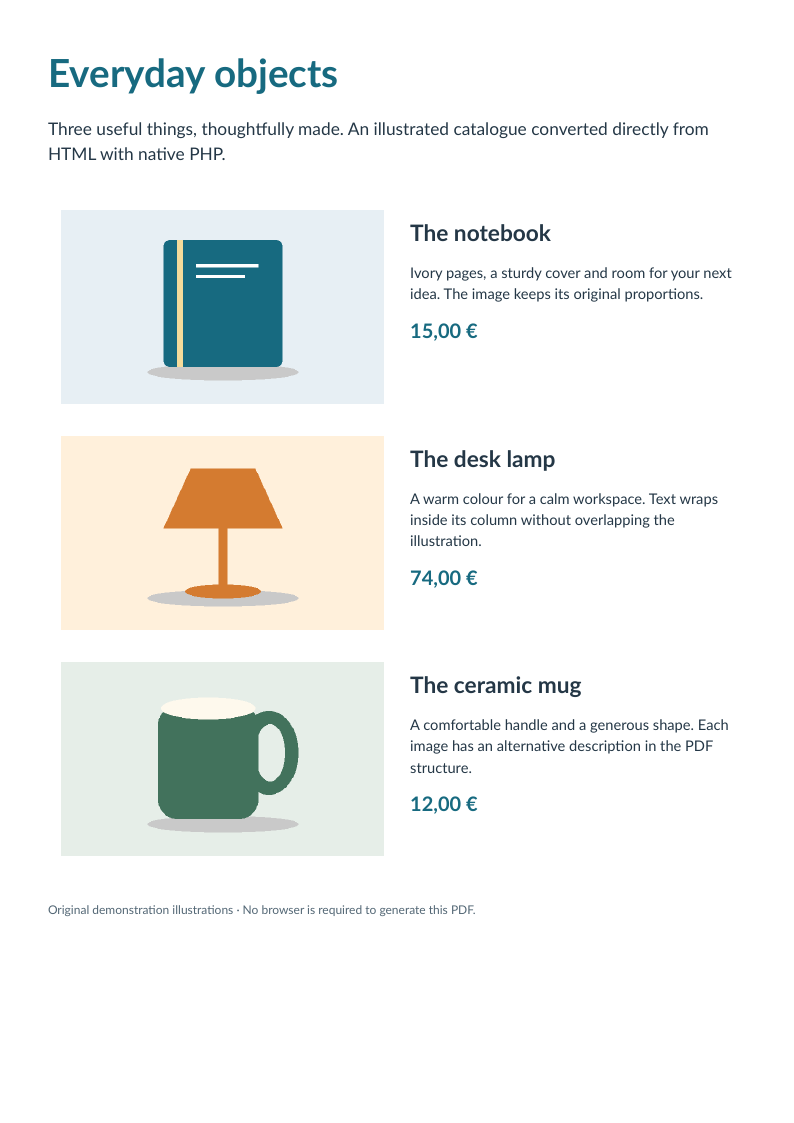
Trois illustrations originales accompagnent les descriptions dans un tableau fixe à deux colonnes. Proportions, padding et retours du texte restent visibles sur une page.
L’oracle vérifie tout le texte source, trois images incorporées et trois éléments Figure avec leurs descriptions alternatives. Les illustrations géométriques sont originales et sous licence MIT.
Source HTML · Télécharger le PDF
php -d memory_limit=512M examples/generate.php _build/examples
python tools/validate_pdf.py --directory _build/examples
Cet exemple illustre le profil documenté, sans certification d’un niveau CSS complet ni PDF/UA.
Voir le résultat PDF
Ce fichier a été généré avec le code de cette documentation. Toutes ses pages sont reproduites ci-dessous ; ouvrir le PDF pour utiliser ses liens et ses signets.
Utiliser le lecteur PDF du navigateur
Ce lecteur dépend du navigateur. Si le document ne s’affiche pas, utiliser « Ouvrir le PDF » ou « Télécharger ».
Source HTML
Lire la source HTML
<!doctype html>
<html lang="en">
<head>
<meta charset="utf-8">
<title>Everyday objects — illustrated catalogue</title>
<style>
body { font-size: 11pt; line-height: 1.45; color: #243746; }
h1 { font-size: 29pt; color: #176a80; margin: 0 0 10pt; }
h2 { font-size: 17pt; margin: 6pt 0 9pt; }
p { margin: 0 0 9pt; }
.intro { font-size: 13pt; margin-bottom: 22pt; }
table { table-layout: fixed; width: 100%; margin-bottom: 20pt; }
td { width: 50%; vertical-align: top; padding: 10pt; }
img { width: 100%; }
.price { font-weight: bold; font-size: 15pt; color: #176a80; }
.footer { font-size: 9pt; color: #526674; margin-top: 12pt; }
</style>
</head>
<body>
<h1>Everyday objects</h1>
<p class="intro">Three useful things, thoughtfully made. An illustrated catalogue
converted directly from HTML with native PHP.</p>
<table><tbody>
<tr><td><img src="notebook.png" alt="Teal notebook with a cream binding"></td><td><h2>The notebook</h2><p>Ivory pages, a sturdy cover and room for your next idea. The image keeps its original proportions.</p><p class="price">15,00 €</p></td></tr>
<tr><td><img src="lamp.png" alt="Amber desk lamp with a broad shade"></td><td><h2>The desk lamp</h2><p>A warm colour for a calm workspace. Text wraps inside its column without overlapping the illustration.</p><p class="price">74,00 €</p></td></tr>
<tr><td><img src="mug.png" alt="Green ceramic mug with a curved handle"></td><td><h2>The ceramic mug</h2><p>A comfortable handle and a generous shape. Each image has an alternative description in the PDF structure.</p><p class="price">12,00 €</p></td></tr>
</tbody></table>
<p class="footer">Original demonstration illustrations · No browser is required to generate this PDF.</p>
</body>
</html>
Code source complet
Code de pdftoolkit/html-to-pdf · Consulter la source au commit documenté ↗ · Source HTML au commit documenté ↗
Lire le script commenté : generate.php
<?php

declare(strict_types=1);

use PDF\HtmlToPdf\ConversionOptions;
use PDF\HtmlToPdf\Converter;
use PDF\HtmlToPdf\Font\FontFace;
use PDF\HtmlToPdf\Font\FontSet;
use PDF\HtmlToPdf\HtmlSource;
use PDF\HtmlToPdf\Resource\ImageAsset;
use PDF\HtmlToPdf\Resource\ResourceCatalog;

require dirname(__DIR__) . '/vendor/autoload.php';

// This CLI explicitly owns file access. The library receives only immutable bytes.
$destination = $argv[1] ?? dirname(__DIR__) . '/_build/examples';
if (!is_dir($destination) && !mkdir($destination, 0777, true) && !is_dir($destination)) {
    throw new RuntimeException('Cannot create the example output directory.');
}
$read = static function (string $path): string {
    $bytes = file_get_contents($path);
    if ($bytes === false) {
        throw new RuntimeException('Cannot read ' . $path);
    }

    return $bytes;
};
$fonts = new FontSet(
    regular: new FontFace($read(__DIR__ . '/assets/fonts/Lato-Regular.ttf')),
    bold: new FontFace($read(__DIR__ . '/assets/fonts/Lato-Bold.ttf')),
    italic: new FontFace($read(__DIR__ . '/assets/fonts/Lato-Italic.ttf')),
);
$images = [];
foreach (['notebook', 'lamp', 'mug'] as $name) {
    $images[$name . '.png'] = new ImageAsset($read(__DIR__ . '/assets/images/' . $name . '.png'));
}
$options = new ConversionOptions(fonts: $fonts, resources: new ResourceCatalog(images: $images));
$converter = new Converter();
$manifest = ['php' => PHP_VERSION, 'engine' => 'native-php', 'documents' => []];
foreach (['invoice', 'catalogue', 'multipage', 'css1'] as $name) {
    $started = hrtime(true);
    $html = $read(__DIR__ . '/sources/' . $name . '.html');
    $result = $converter->convert(new HtmlSource($html), $options);
    file_put_contents($destination . '/' . $name . '.pdf', $result->pdf);
    $manifest['documents'][$name] = [
        'pages' => $result->pageCount,
        'elapsedSeconds' => (hrtime(true) - $started) / 1e9,
        'peakMemoryBytes' => memory_get_peak_usage(true),
        'sourceSha256' => hash('sha256', $html),
        'pdfSha256' => hash('sha256', $result->pdf),
        'bytes' => strlen($result->pdf),
        'diagnostics' => $result->diagnostics,
    ];
    fwrite(STDOUT, $name . ': ' . $result->pageCount . ' page(s), ' . strlen($result->pdf) . " bytes\n");
}
file_put_contents($destination . '/manifest.json', json_encode($manifest, JSON_PRETTY_PRINT | JSON_UNESCAPED_UNICODE | JSON_THROW_ON_ERROR) . "\n");